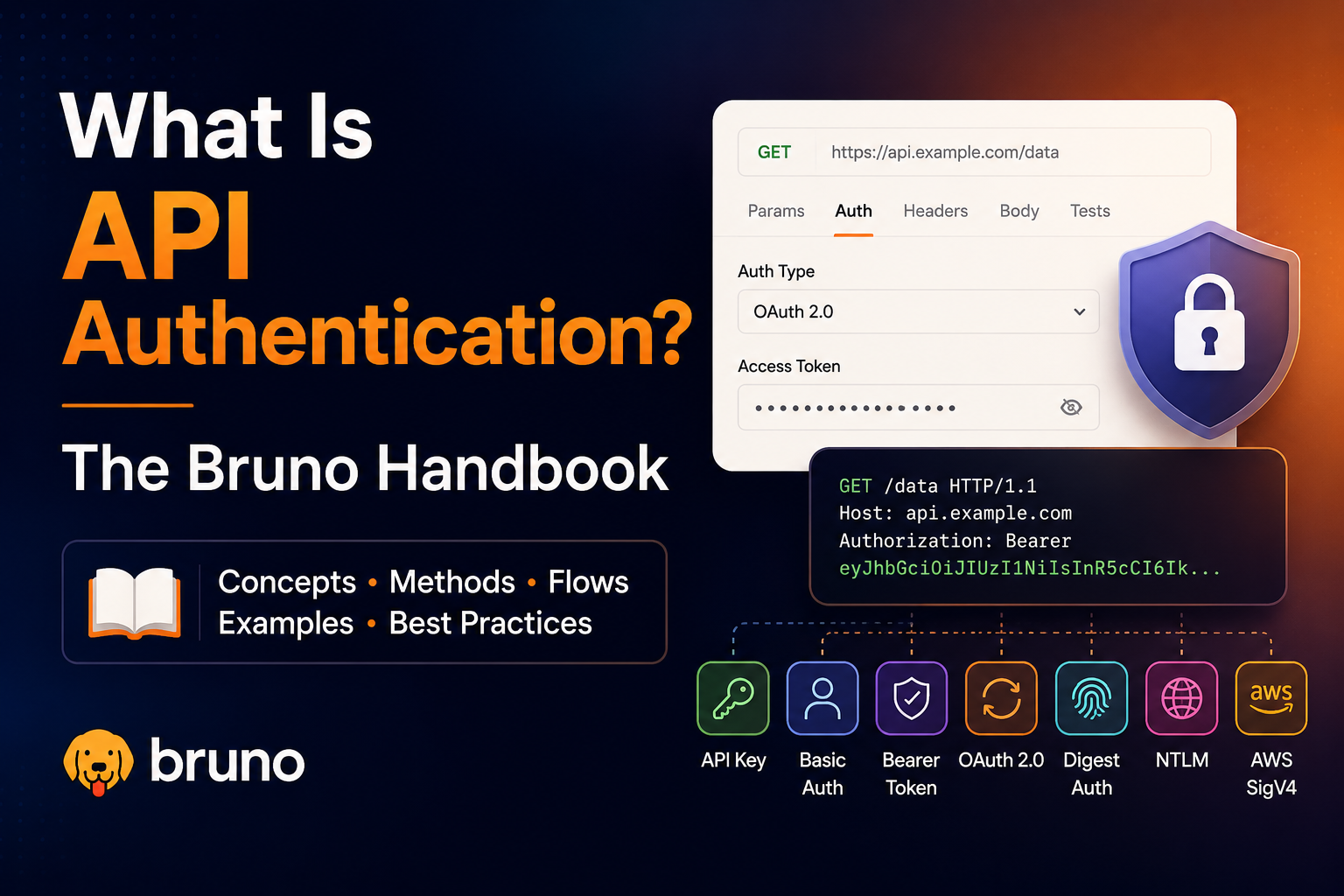
Every API you call needs to know who you are and whether you are allowed to access the resource. That is API authentication. Bruno ships with seven authentication protocols out of the box, from simple username/password schemes to full OAuth 2.0 flows with browser redirects. This handbook explains how API authentication works in general, then walks through each method Bruno supports with clear flow diagrams so you know exactly what happens when you click Send.
Table of Contents
What Is API Authentication?
API authentication is the process of proving your identity to an API server before it grants access to protected resources. Without it, anyone on the internet could read private data, modify records, or impersonate other users.
At a high level, every authenticated request follows the same pattern: a client (your app or API client) sends credentials or proof of identity to a server, the server validates that proof, and only then returns the requested data.
Client
Bruno / your app
Proof
Token, signature, hash
Server
Validates & responds
Authentication is often confused with authorization. Authentication answers "Who are you?" Authorization answers "What are you allowed to do?" You authenticate first; the server then checks permissions.
Common approaches
- Static credentials — username and password sent with every request (Basic Auth).
- Tokens — a short-lived access token obtained once and reused (Bearer, OAuth 2.0).
- Challenge-response — the server issues a challenge; the client proves identity without sending the password in plain text (Digest, NTLM).
- Request signing — the client cryptographically signs each request so the server can verify integrity (OAuth 1.0, AWS Sig V4).
Authentication in Bruno
Bruno lets you attach authentication details to any request from the Auth tab. Choose an auth type, fill in the fields, and Bruno automatically populates the correct headers, query parameters, or body fields when you send the request.
You can configure auth at three levels:
- Request level — auth applies to a single request only.
- Folder level — all requests inside the folder inherit the auth config.
- Collection level — all requests in the collection inherit the auth config (unless overridden).
Store sensitive values in environment variables or a secret manager and reference them as instead of hard-coding credentials in your collection files.
Quick Reference
| Method | Best for | User involved? |
|---|---|---|
| Basic Auth | Simple internal APIs, dev environments | No |
| Bearer Token | JWTs, API keys, pre-issued tokens | No |
| Digest Auth | Legacy HTTP APIs with challenge-response | No |
| OAuth 1.0 | Legacy APIs (Twitter, enterprise integrations) | Yes (during setup) |
| OAuth 2.0 | Modern APIs, SSO, third-party access | Depends on grant type |
| AWS Sig V4 | Amazon Web Services APIs | No |
| NTLM | Windows / Active Directory environments | No |
Basic Auth
Basic authentication is the simplest form of HTTP authentication. You send a username and password with every request, encoded as Base64 in the Authorization header. It is easy to set up but should only be used over HTTPS — Base64 is encoding, not encryption.
How It Works
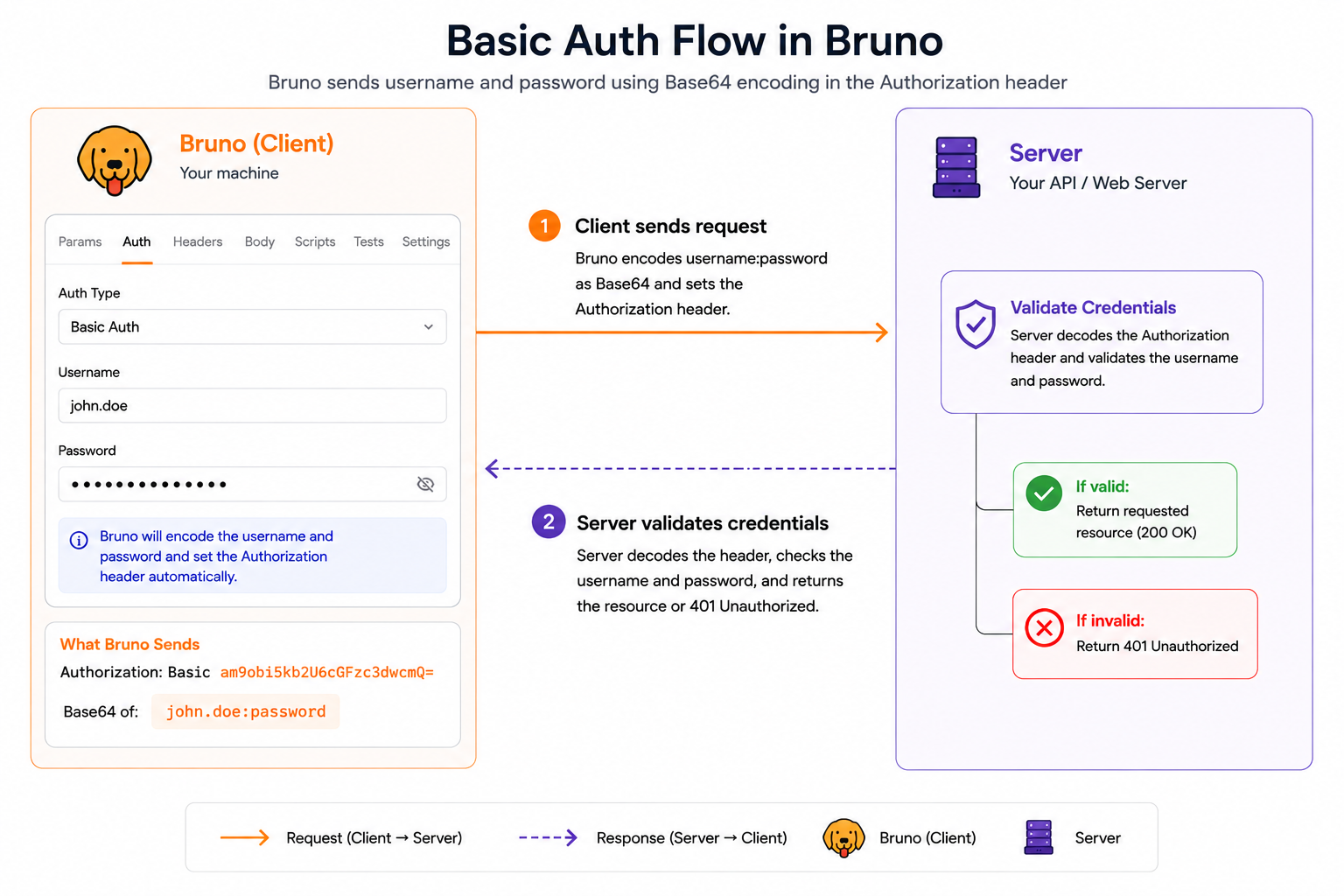
Client sends request
Bruno encodes username:password as Base64 and sets Authorization: Basic <encoded>
Server validates credentials
Server decodes the header, checks username and password, and returns the resource or 401 Unauthorized.
In Bruno: Auth tab → select Basic Auth → enter Username and Password. Bruno populates the Authorization header automatically.
Bearer Token
Bearer authentication passes a pre-issued access token (often a JWT or API key) in the Authorization header. The token is typically obtained separately from a login endpoint, an OAuth flow, or your API dashboard and then reused until it expires.
How It Works
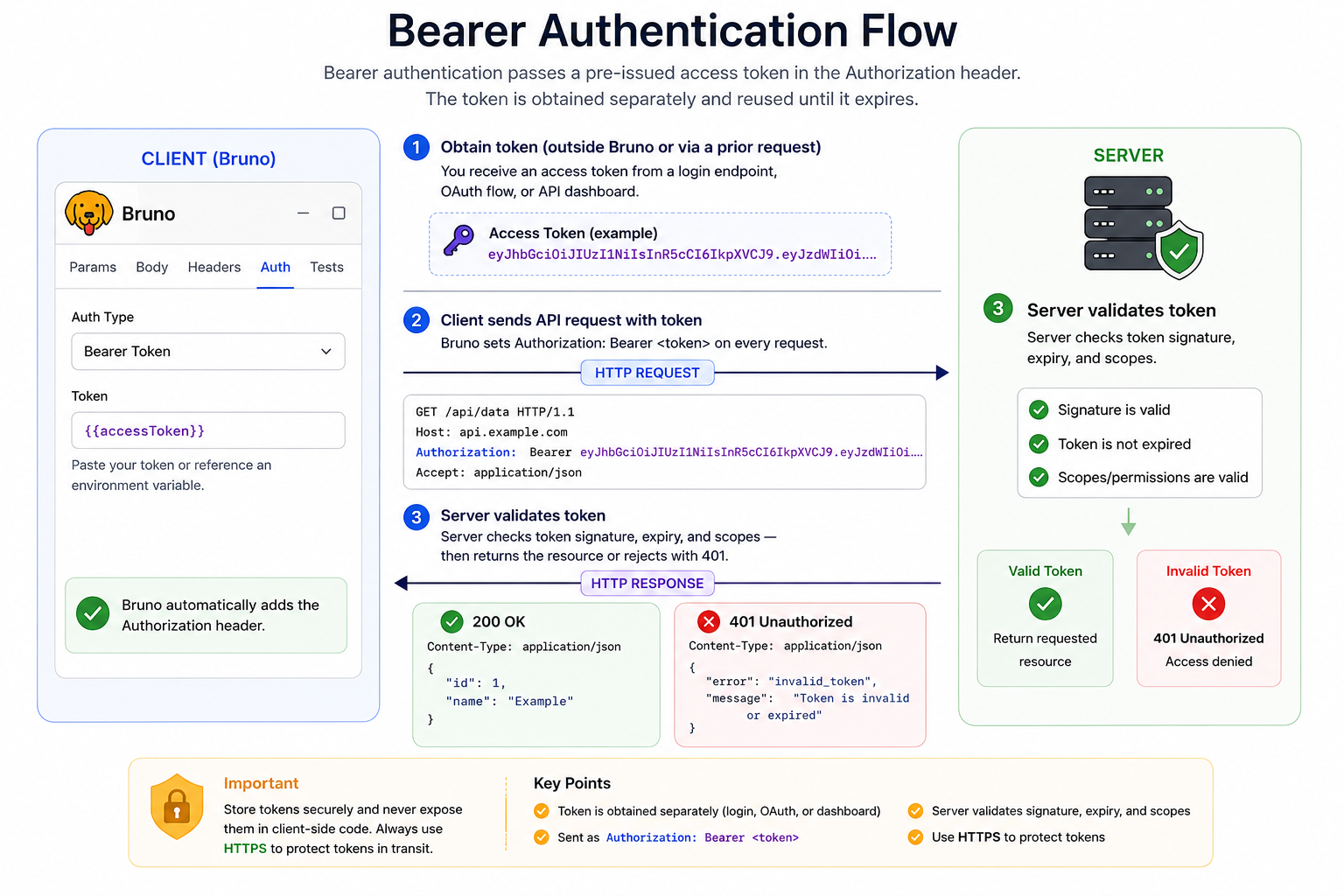
Obtain token (outside Bruno or via a prior request)
You receive an access token from a login endpoint, OAuth flow, or API dashboard.
Client sends API request with token
Bruno sets Authorization: Bearer <token> on every request.
Server validates token
Server checks token signature, expiry, and scopes — then returns the resource or rejects with 401.
In Bruno: Auth tab → select Bearer Token → paste your token or reference an environment variable like .
Digest Auth
Digest authentication uses a challenge-response pattern. Instead of sending the password directly, the client receives a one-time challenge from the server (a nonce and realm), computes a hash using the password, and sends that hash back. The password never travels over the wire in plain text.
How It Works
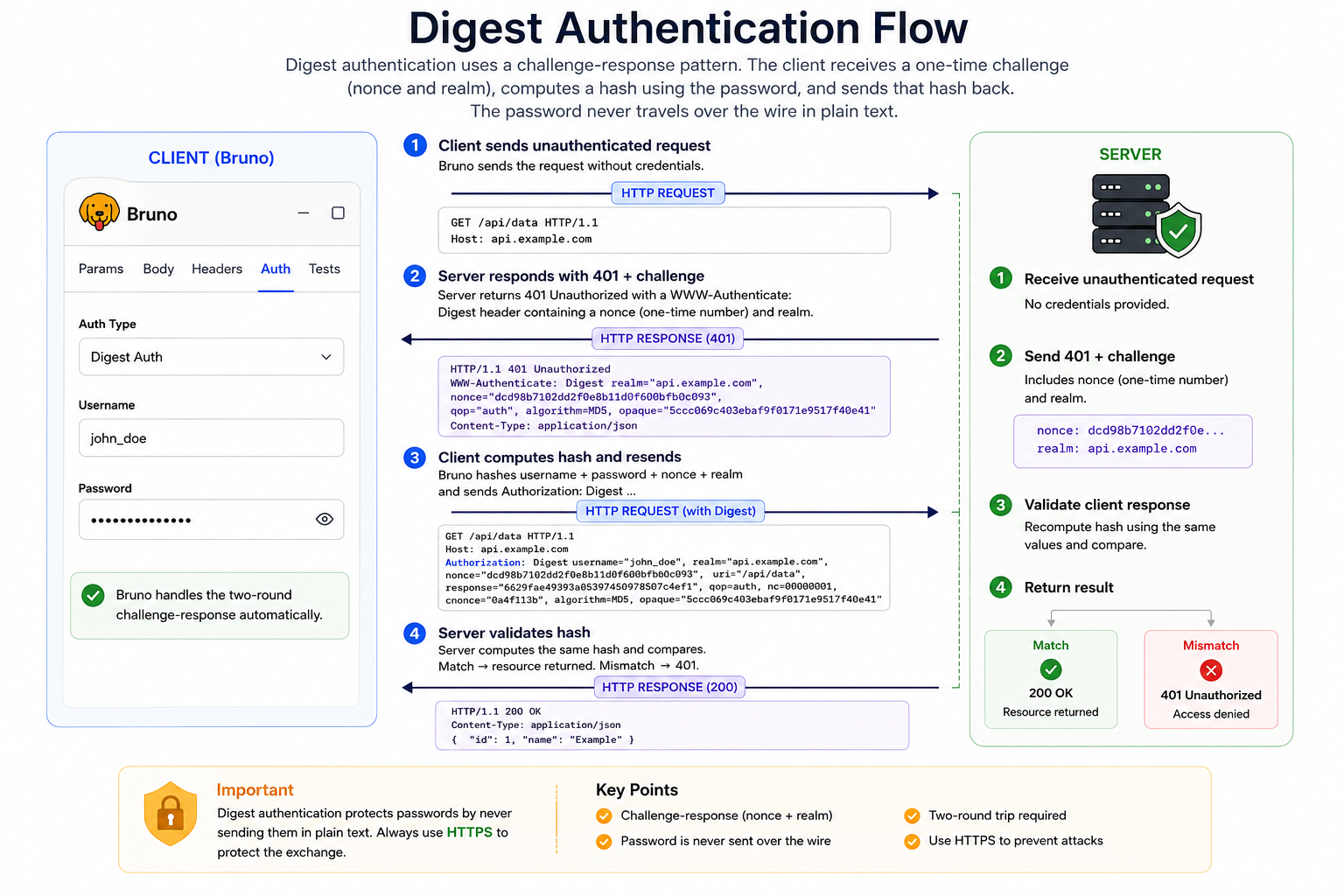
Client sends unauthenticated request
Bruno sends the request without credentials.
Server responds with 401 + challenge
Server returns 401 Unauthorized with a WWW-Authenticate: Digest header containing a nonce (one-time number) and realm.
Client computes hash and resends
Bruno hashes username + password + nonce + realm and sends Authorization: Digest ...
Server validates hash
Server computes the same hash and compares. Match → resource returned. Mismatch → 401.
In Bruno: Auth tab → select Digest Auth → enter Username and Password. Bruno handles the two-round challenge-response automatically.
OAuth 1.0
OAuth 1.0 lets third-party applications access protected resources on behalf of a user without sharing the user's password. Every request is cryptographically signed using consumer keys and access tokens, giving the API message integrity and it can verify the request body was not tampered with in transit.
How It Works
Client
Bruno
User
Resource Owner
Server
API Provider
Request temporary token
Client → Server: signed request with Consumer Key + Secret. Server returns temporary oauth_token.
User authorizes in browser
User → Server: logs in and grants permission. Server redirects back with an oauth_verifier.
Exchange for access token
Client → Server: temporary token + verifier. Server returns long-lived access_token + access_token_secret.
Signed API requests (Bruno handles this)
Every request is signed with Consumer Key + Access Token. Server validates the signature and returns the resource.
In Bruno: Auth tab → select OAuth 1.0 → enter Consumer Key, Consumer Secret, Token, and Token Secret. Bruno signs every request automatically. Configure at request, folder, or collection level. Supports HMAC-SHA1/256/512, RSA, and PLAINTEXT signature methods.
OAuth 2.0
OAuth 2.0 is the modern standard for delegated authorization. Instead of signing every request, the client obtains an access token from an authorization server and sends it with API calls. Bruno supports OAuth 2.0 at collection, folder, and request level with multiple grant types.
Authorization Code (with user login)
The most common OAuth 2.0 flow. The user logs in through a browser, and Bruno receives an authorization code that it exchanges for an access token. This is the flow used by Google, Azure AD, Keycloak, and most SSO providers.
User clicks "Get Access Token" in Bruno
Bruno opens a browser (built-in or system browser) to the IdP's Authorization URL with Client ID and scopes.
User logs in at the Identity Provider
User enters credentials (password, 2FA, SSO) on the IdP login page and grants permission to Bruno.
IdP redirects back with authorization code
Bruno intercepts the redirect and captures the code — the Callback URL is never actually navigated to.
Bruno exchanges code for access token
Bruno → Token endpoint: sends code + Client ID + Client Secret. Server returns access_token (and optionally refresh_token).
Token attached to API requests
Bruno adds the token to headers (Authorization: Bearer ...) or URL. Auto-fetch and auto-refresh keep it valid.
PKCE recommended: Enable "Use PKCE" when your provider supports it — it adds an extra layer of security to the authorization code flow, especially for public clients.
Client Credentials (machine-to-machine)
No user involved. The application authenticates directly with its own Client ID and Client Secret to obtain an access token. Common for backend services, cron jobs, and service-to-service communication.
Client sends credentials to token endpoint
Bruno → Token URL: client_id + client_secret + grant type client_credentials
Server returns access token
Authorization server validates credentials and returns an access_token.
Client uses token for API calls
Bruno attaches the token to subsequent requests automatically.
Password Credentials (Resource Owner)
The client sends the user's username and password directly to the token endpoint along with Client ID and Secret. The server returns an access token. This grant type is deprecated in OAuth 2.1 but still used by some legacy APIs.
Client sends username + password to token endpoint
Bruno → Token URL: username + password + client_id + client_secret
Server returns access token → used for API calls
No browser redirect. Token is obtained and attached in one step.
Resources:
1. Explore the oauth-keycloak sample collection for real-world OAuth 2.0 flows covering each grant types. 2. What is OAuth 2.0? - Explained for developers
AWS Signature V4
AWS Signature Version 4 is Amazon's custom HTTP authentication scheme. Instead of sending credentials directly, the client creates a canonical request, signs it with your Secret Access Key using HMAC-SHA256, and sends the signature in the Authorization header. AWS validates the signature to confirm identity and request integrity.
How It Works
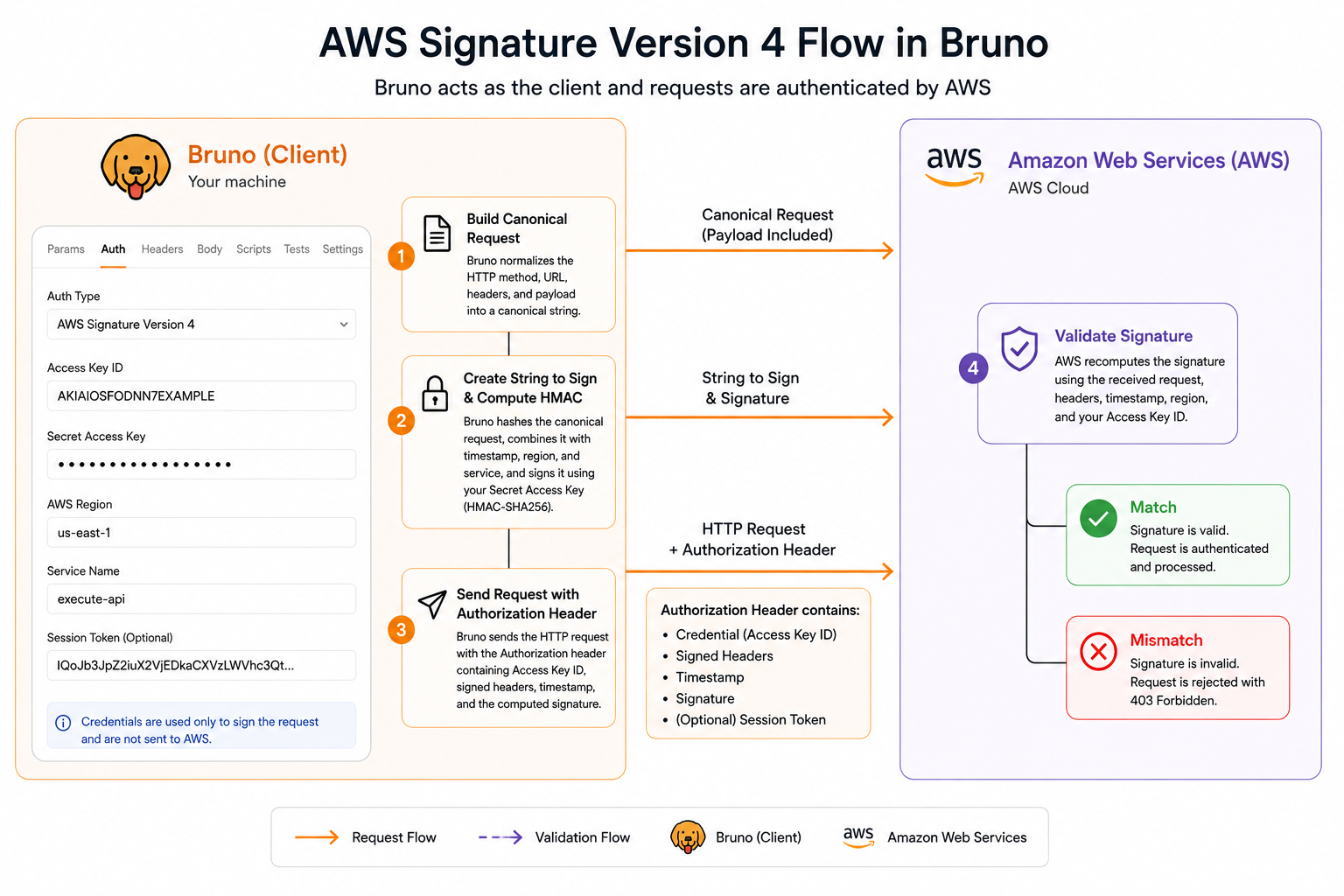
Build canonical request
Bruno normalizes the HTTP method, URL, headers, and payload into a canonical string.
Create string to sign & compute HMAC
Bruno hashes the canonical request, combines it with timestamp and region, and signs with your Secret Access Key.
Send request with Authorization header
Header includes Access Key ID, signed headers, timestamp, and the computed signature.
AWS validates signature
AWS recomputes the signature server-side. Match → request processed. Mismatch → 403 Forbidden.
In Bruno: Auth tab → select AWS Sig V4 → enter Access Key ID, Secret Key, Service Name, and AWS Region. Optionally add a Session Token for temporary credentials.
NTLM
NTLM (NT LAN Manager) is a challenge-response authentication protocol used primarily in Windows and Active Directory environments. Like Digest Auth, it never sends the password in plain text instead, a multi-step handshake negotiates authentication between client and server.
How It Works
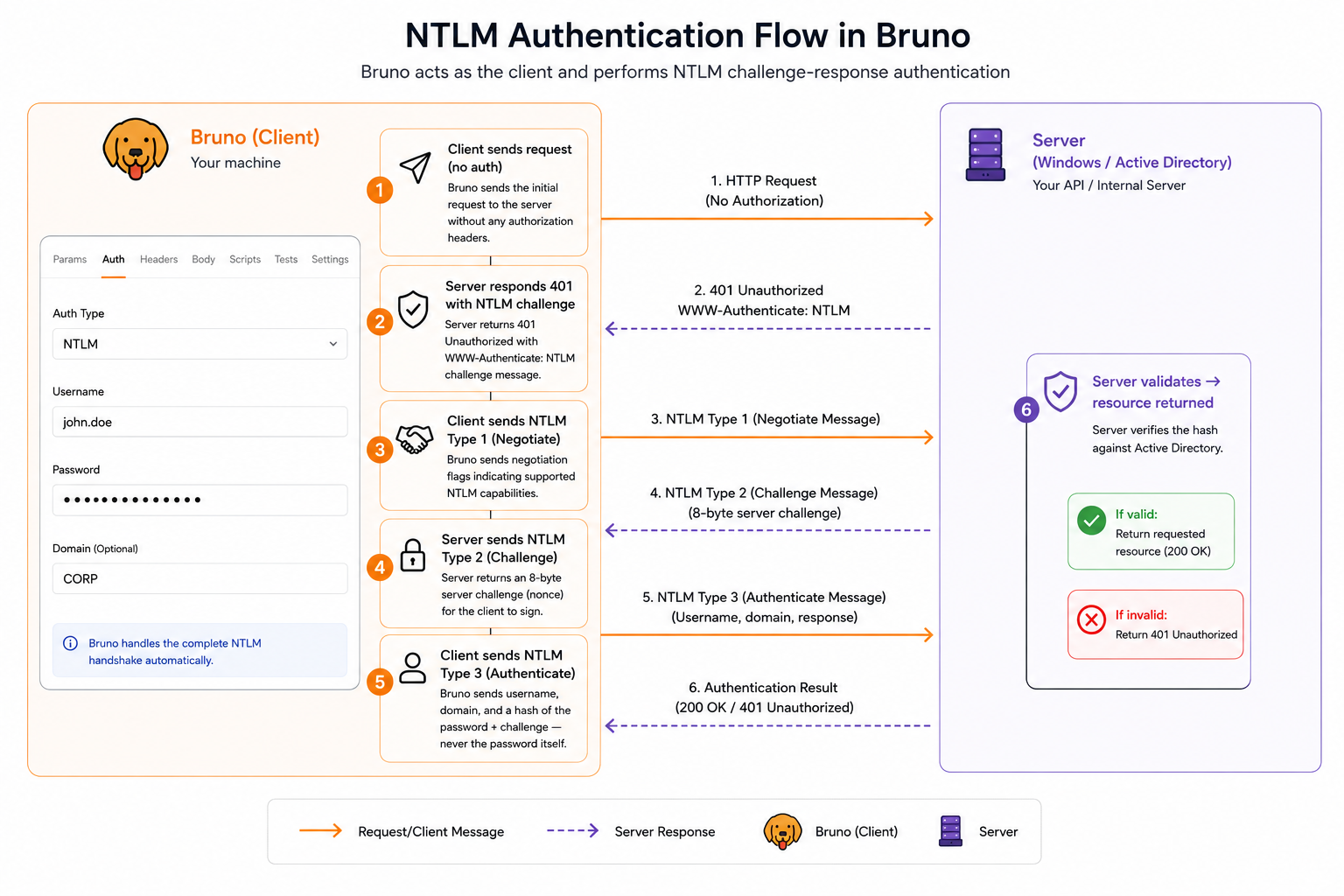
Client sends request (no auth)
Bruno sends the initial request to the server.
Server responds 401 with NTLM challenge
Server returns 401 with WWW-Authenticate: NTLM challenge message.
Client sends NTLM Type 1 (Negotiate)
Bruno sends negotiation flags indicating supported NTLM capabilities.
Server sends NTLM Type 2 (Challenge)
Server returns an 8-byte server challenge (nonce) for the client to sign.
Client sends NTLM Type 3 (Authenticate)
Bruno sends username, domain, and a hash of the password + challenge — never the password itself.
Server validates → resource returned
Server verifies the hash against Active Directory. Success → API response. Failure → 401.
In Bruno: Auth tab → select NTLM → enter Username, Password, and optionally Domain. Bruno handles the full three-message handshake automatically.
Try It Out
You can quickly import and test Authentication examples directly inside Bruno using the collection below.
The collection includes ready-to-use all types of authentication examples, helping you understand the authentication flow and walkthrough of each auth types.
Wrap Up
Bruno gives you a complete authentication toolkit from the simplest Basic Auth to full OAuth 2.0 browser flows with PKCE and auto-refresh. Every method is configured from the same Auth tab, can be inherited at collection or folder level, and supports Bruno variables for secure credential management.
- Simple APIs → Basic Auth or Bearer Token
- Legacy HTTP APIs → Digest Auth or NTLM
- Modern APIs with user login → OAuth 2.0 Authorization Code
- Service-to-service → OAuth 2.0 Client Credentials or AWS Sig V4
- Legacy signed APIs → OAuth 1.0
Pick the right auth, configure it once, and let Bruno handle the rest.