

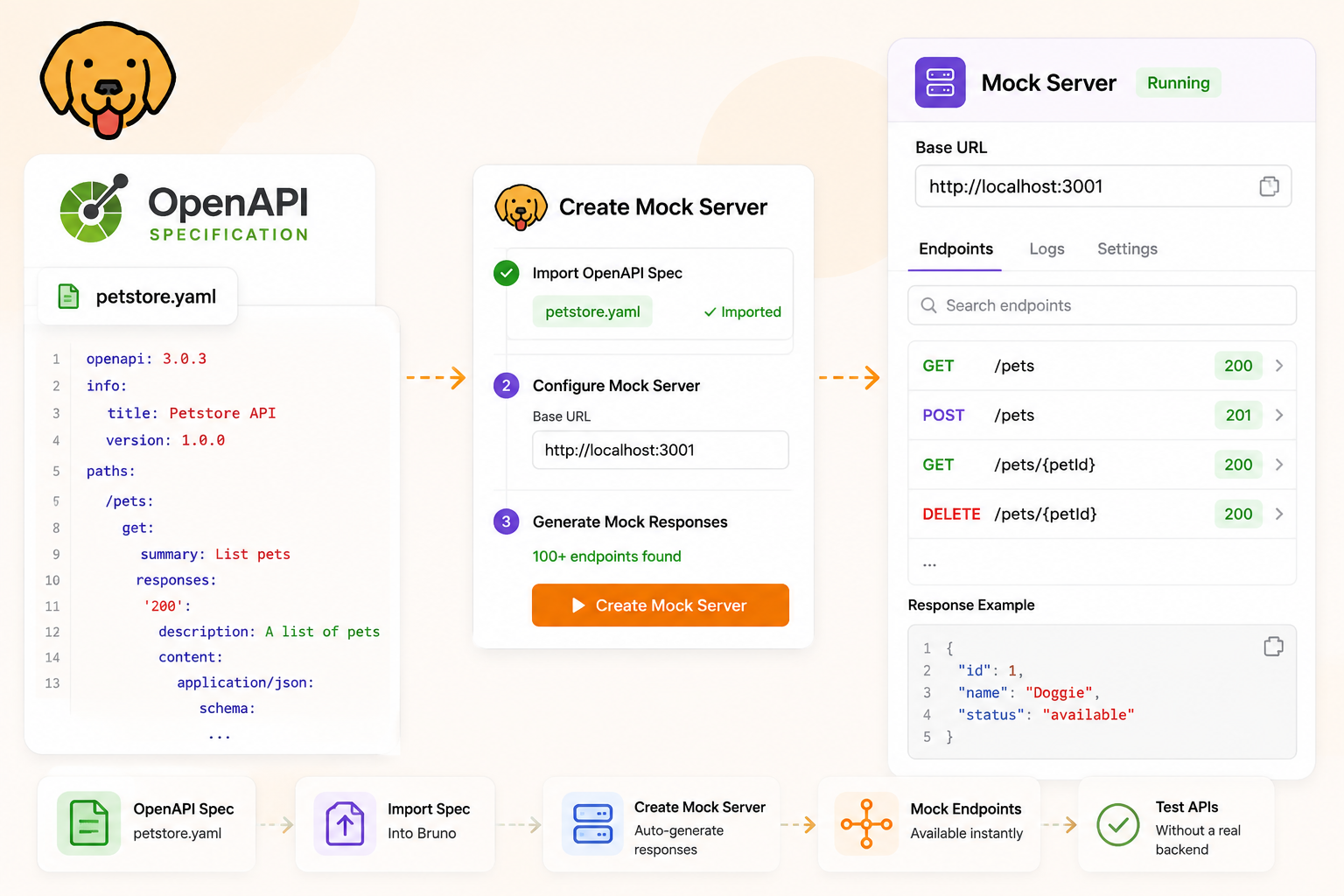
Teams often have a contract before they have a running API. An OpenAPI specification already lists paths, methods, status codes, and schemas. What they still need is something that answers HTTP with those shapes so a UI, a contract test, or a demo can run today. That is the mock requirement: a local server that honours the spec without waiting for the real backend.
This guide is the OpenAPI path in Bruno: load a spec, link a mock to it, generate responses from operations, then use the same dashboard you would for collection examples — Responses, rules, Try, Routes, and the Request Log. If you already followed the collection-and-examples walkthrough, most of the dashboard will look familiar. Official reference: Mock Servers from OpenAPI, plus overview, create, and run.
Mock Servers are currently in beta. Feel free to try them out and share your feedback on GitHub Discussions.
Table of Contents
- The Mock Requirement
- What Is a Mock Server?
- What Is an OpenAPI Spec?
- Benefits of Mocking an OpenAPI Spec for Testing
- Spec-Linked vs Collection-Linked Mocks
- Enable OpenAPI in Bruno
- Open an OpenAPI Spec in Bruno
- Create a Mock Server from the Spec
- Generate from API Spec
- Sync with Spec When the File Changes
- Start the Server
- The Responses Tab
- Response Editor: Rules, Demo Request, and Try
- Routes and Request Logs
- Wrap Up
The Mock Requirement
A backend team can publish openapi.yaml in week one. The frontend still cannot call GET /pet/{petId} until something listens on a URL and returns JSON. Until then, screens stall, Cypress tests hit real staging (or nothing), and “the spec says 400” is a document, not a behavior you can click.
The requirement is not “build a fake microservice.” It is:
- Honour the same paths and methods as the spec
- Return documented statuses (200, 400, 404, …) with bodies that look like the schema or spec examples
- Run locally, so any client can point at
http://localhost:<port> - Stay tied to the file, so when the spec gains an endpoint you can regenerate instead of hand-editing a mock forever
Bruno’s spec-linked mock is that stand-in. You are not rewriting the contract in a second tool; you are serving it.
What Is a Mock Server?
A mock server is a local HTTP process that pretends to be the API. Clients send real requests. Bruno matches method + path (and optional rules) and returns the status, headers, and body you configured. Closing Bruno stops every running mock; restarting does not auto-start them, so a port is never claimed silently.
Bruno can source a mock from a collection (saved examples), an API spec, or standalone responses you type in. This post is the middle option.
What Is an OpenAPI Spec?
OpenAPI (often still called “Swagger” in conversation) is a machine-readable description of an HTTP API, usually a YAML or JSON file. It is the contract: which URLs exist, which verbs they accept, which parameters they take, and which responses they promise including JSON Schema for bodies.
A tiny slice looks like this a path, a method, and a documented 200:
paths:
  /pet/{petId}:
    get:
      operationId: getPetById
      parameters:
        - name: petId
          in: path
          required: true
          schema:
            type: integer
      responses:
        "200":
          description: Successful operation
          content:
            application/json:
              schema:
                $ref: "#/components/schemas/Pet"
That file is documentation, codegen input, and in Bruno mock input. Bruno converts OpenAPI path params from {petId} to mock paths like /pet/:petId.
A public example: Petstore
If you do not have a company spec yet, use the classic sample API: Swagger Petstore 3. The interactive UI is at that URL. The OpenAPI 3 document behind it is typically served as JSON from the same site (for example /api/v3/openapi.json on that host). Download the YAML or JSON, keep it in your Bruno workspace, and you have a realistic multi-path spec: pets, store orders, users including several status codes on one operation.
Petstore is for learning. For a real product, commit your spec next to the collection so the mock stays linked to the file the team already reviews in PRs. See Viewing existing OAS files in Bruno.
Benefits of Mocking an OpenAPI Spec for Testing
Collection examples are excellent when you already captured live traffic. A spec is excellent when the contract is the source of truth and the live API is missing, incomplete, or not allowed in CI.
For testing in general this means: frontend tests can run in CI against localhost; designers can click error states; QA can script “happy path vs validation error” without test-user accounts. It is still a mock — no real persistence, no real auth server — so treat it as a contract stand-in, not staging.
Spec-Linked vs Collection-Linked Mocks
| Collection + examples | OpenAPI spec | |
|---|---|---|
| Best when | You already have requests and captured (or written) examples | The OAS file is the contract; you may not have a collection yet |
| Populate button | Sync with Examples | Generate from API Spec, later Sync with Spec |
| Bodies come from | Saved examples (live or from scratch) | Spec examples, else derived schema |
| Dashboard after that | Same Responses editor, rules, Try, Routes, Request Log | |
Enable OpenAPI in Bruno
Until API Spec is on, there is no place to attach a file.
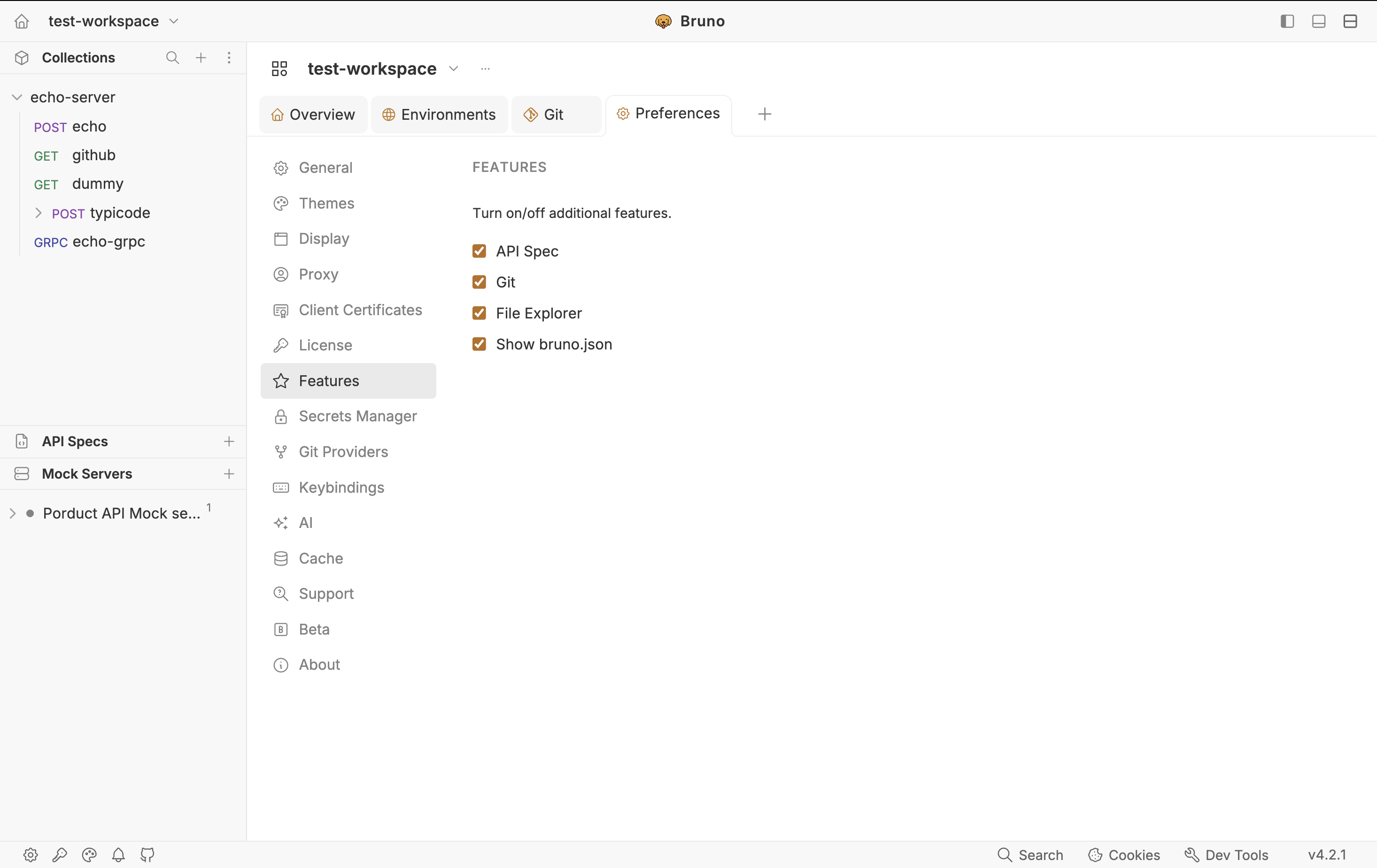
Open Preferences → Features.
Enable API Spec. An API Spec section appears in the sidebar.
Open an OpenAPI Spec in Bruno
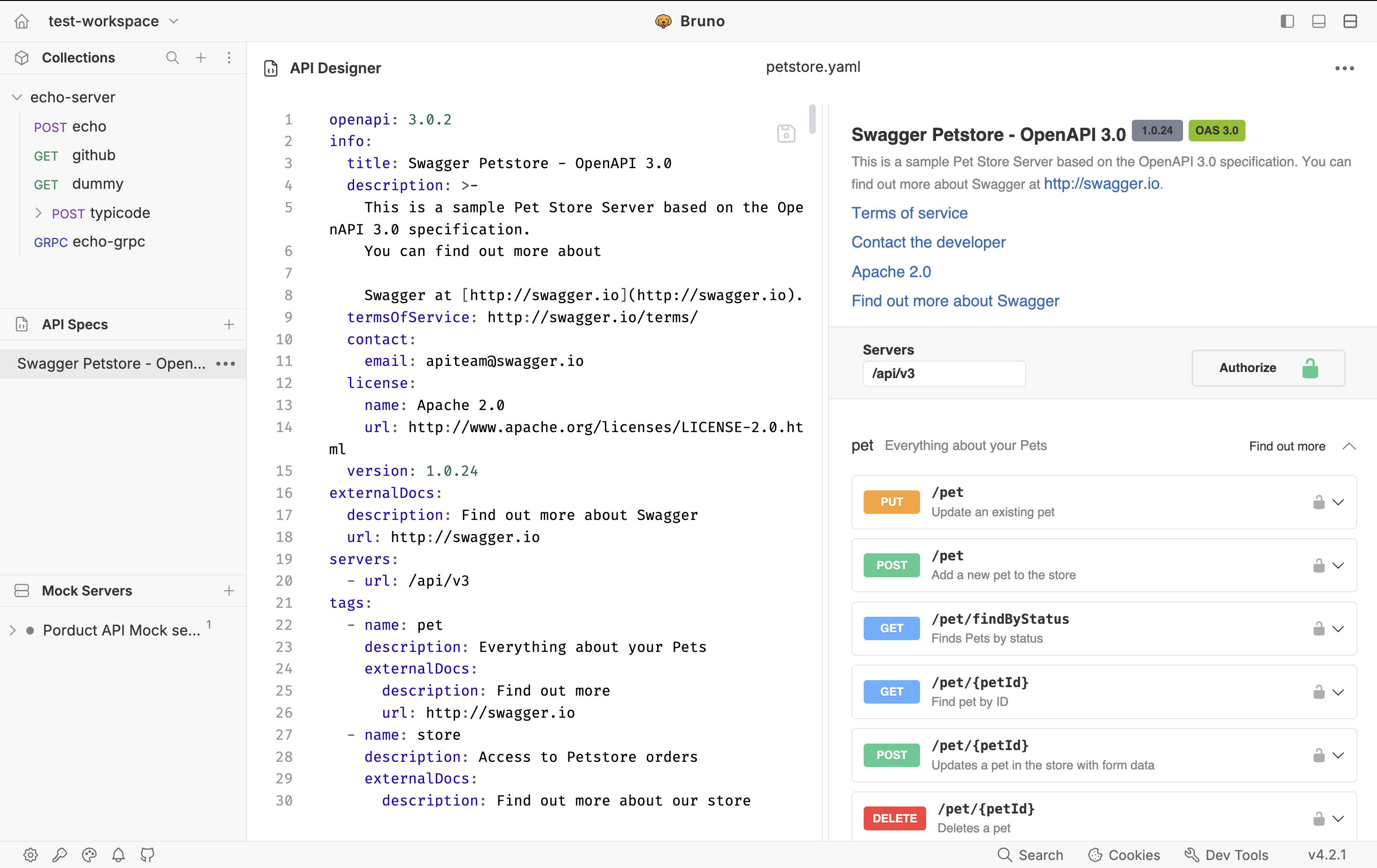
Bruno views existing OAS files in a dedicated sidebar section (a Swagger-like viewer). Keep the file in the workspace so the mock can stay linked to it.
In the sidebar, click + in API Spec.
Choose Open API Spec and pick a .yaml or .json file from disk and your service spec, or a downloaded Petstore document.
Click the spec in the sidebar to open the viewer. Confirm you see the operations you care about (for Petstore, look for pet, store, and user paths).
You can also create a new OAS from the same menu if you are designing from scratch. For mocking, an existing file is the usual starting point.
Create a Mock Server from the Spec
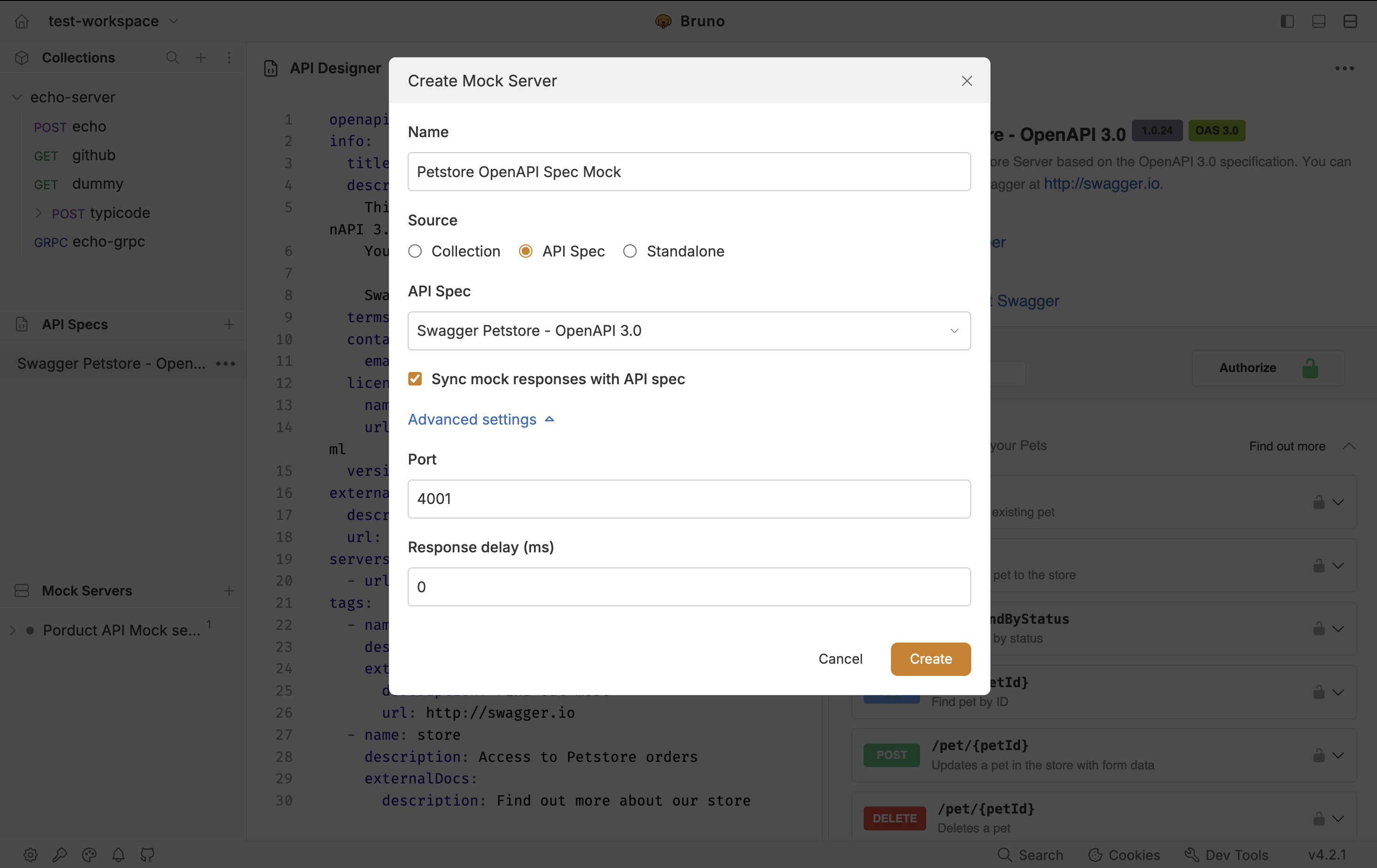
Creating the mock does not generate responses and does not start the process. Sequence: create (linked to spec) → generate → start.
Click + next to Mock Servers.
Enter a name (for example petstore-mock) and select Source (API Spec).
Keep Sync mock responses with API spec checkbox enable and Optionally set Port and Response delay under Advanced settings.
Click Create. The mock dashboard opens as its own tab. The Responses list is still empty until you generate.
Generate from API Spec
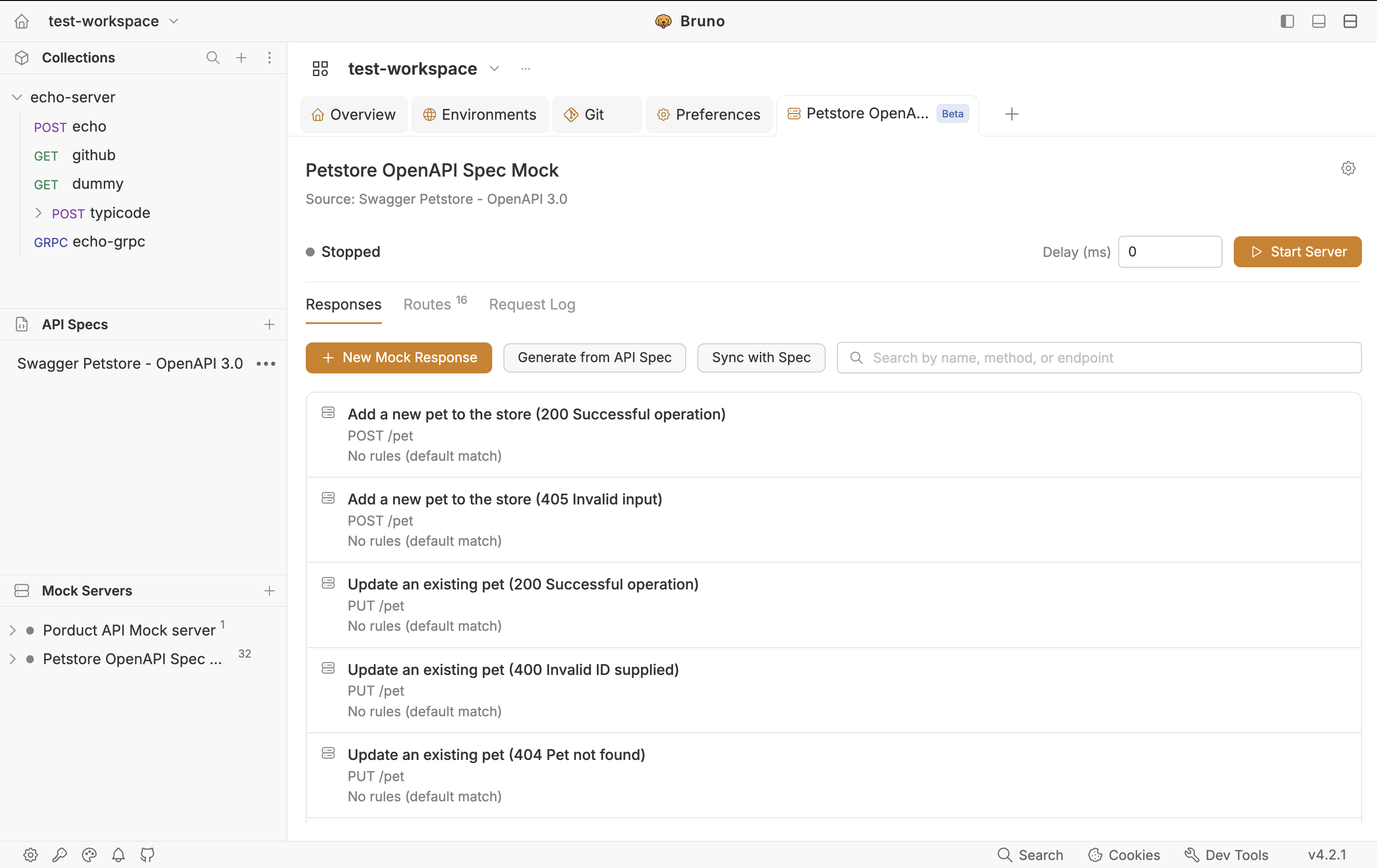
Bruno creates one mock response per operation and status in the spec. Bodies come from examples in the spec when present, otherwise from the schema where Bruno can derive them. Search the Responses list by path or operation name.
Several statuses, same route. If an operation documents both 200 and 400, you get several mock responses on the same method + path. Until you add rules, the mock will keep returning the default for that route. Generating is not the same as “always pick the right error body.”
Sync with Spec When the File Changes
After the first generate, the toolbar shows Sync with Spec instead of (or in addition to) a first-time generate, depending on whether responses already exist.
Use Sync with Spec after you add endpoints, rename paths, or update example payloads in the OpenAPI file. Bruno re-imports the spec and updates responses that still match an operation by method and path. Custom responses you added or changed stay in place.
Treat generate as the first fill. Treat sync as “the spec moved; refresh matching rows.” If you heavily edited a generated body and also changed that example in the spec, know that a sync can overwrite responses that still match method + path custom extras you added as new responses are the ones preserved.
Start the Server
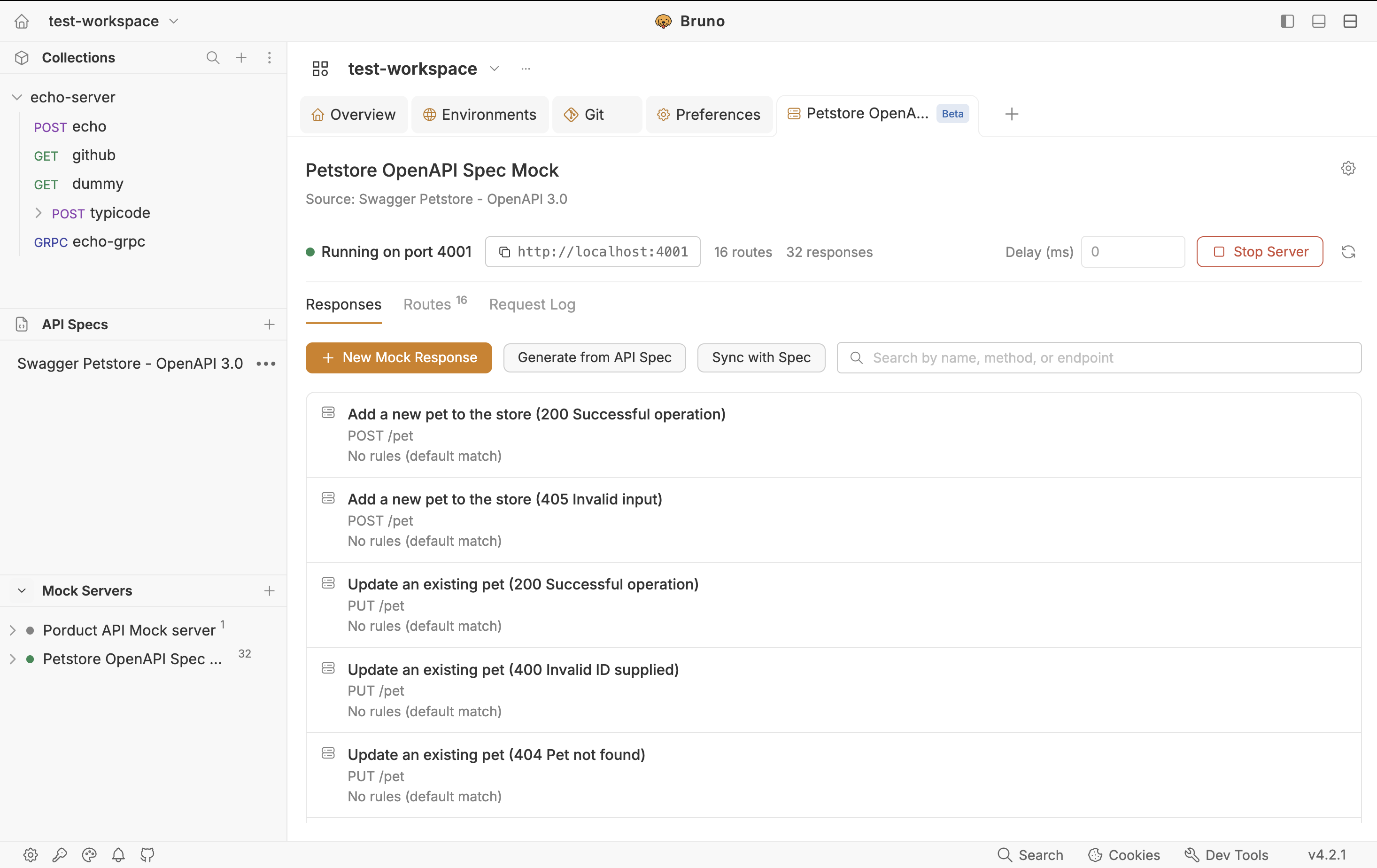
Click Start Server in the dashboard header. Default port is 4000; new mocks increment if that port is taken. If start fails because the configured port is busy, change it under gear → Advanced settings. Copy the base URL from the header.
# example: Petstore-style path after Bruno maps {petId} → :petId
curl http://localhost:4000/pet/1
Point your app’s API base URL at that origin. CORS is on by default, so a local frontend can call the mock without extra headers. Runtime details (trailing slashes, 404 payloads, delay only on matches) match the collection-based mock see the companion post or Run a mock server.
The Responses Tab
This is the catalogue of everything the mock can return. After generate, you will see many rows if the spec is large (Petstore is a good illustration). Each row is still a first-class mock response: method, path (:param style), status, headers, expected body.
You can always add New Mock Response for a route the spec does not cover yet (a workaround header, a demo-only 503). Those extras are what sync is designed to keep when you re-import the spec.
Response Editor: Rules, Demo Request, and Try
Generated spec responses use the same editor as collection mocks. Left: when this response is chosen (rules, demo request, URL, Try, Open as New Request). Right: what is returned (Expected body, Headers, Try Result).
This is the place you finish the job generate cannot do: pick among 200 vs 400 on the same path.
Open any mock response. Click on Add rule button.
Add conditions on body, headers, or query. Nested JSON keys use dotted paths (user.type or $.user.type). Combine with All rules AND (default) or Any rule OR.
Click Save. Rules do nothing until you save.
Demo Request is generated from those rules, a sample request that would select this response. You do not register the route by typing the demo; generate already registered paths from the spec.
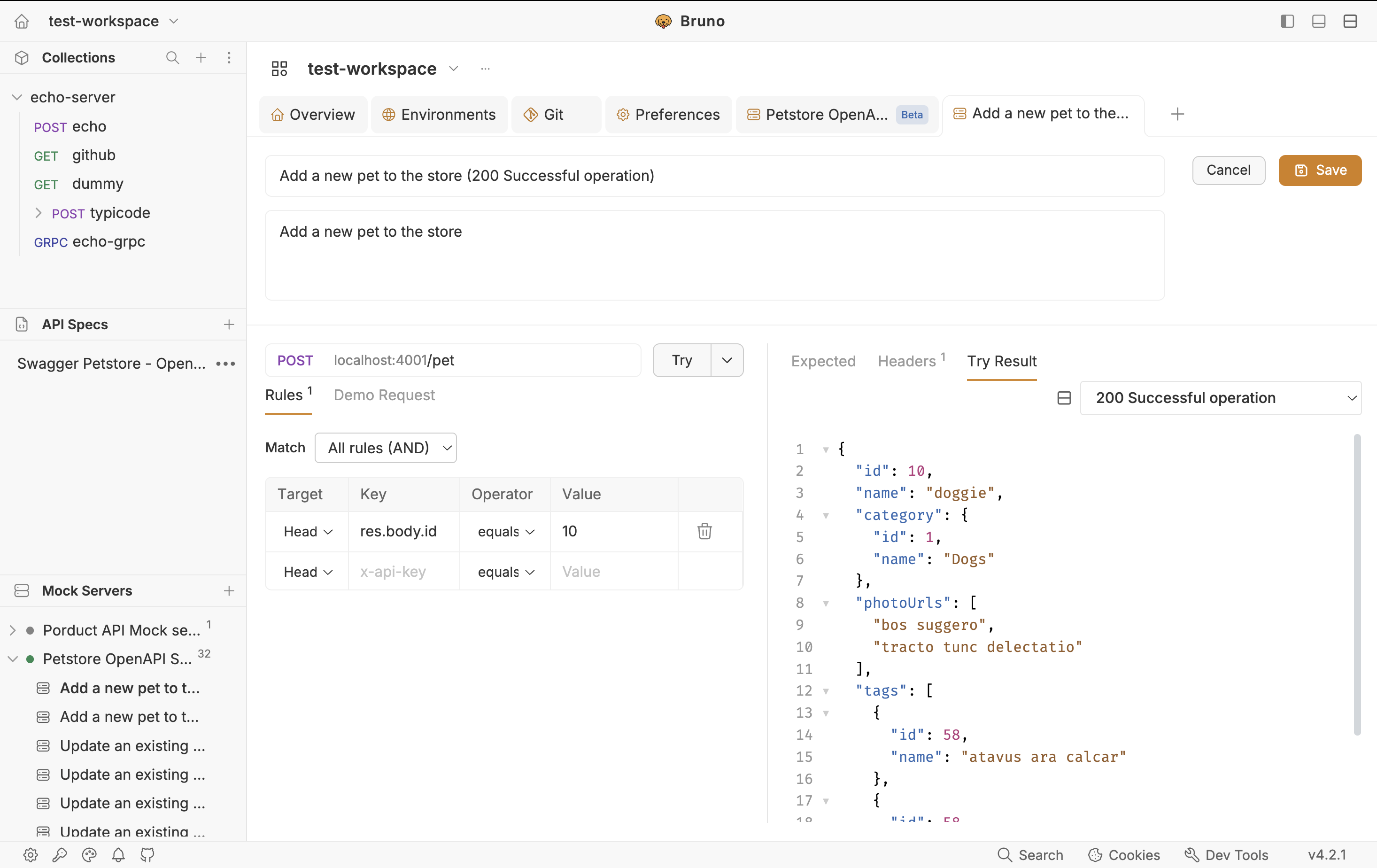
With the server running, Try sends that demo to localhost. Open Try Result for the body and headers. The call also appears in the Request Log. Open as New Request copies the demo into a Bruno request tab so you can iterate like any other call.
Field-by-field rule tables and a full body-match example are in the companion collection post and in Rules.
Routes and Request Logs
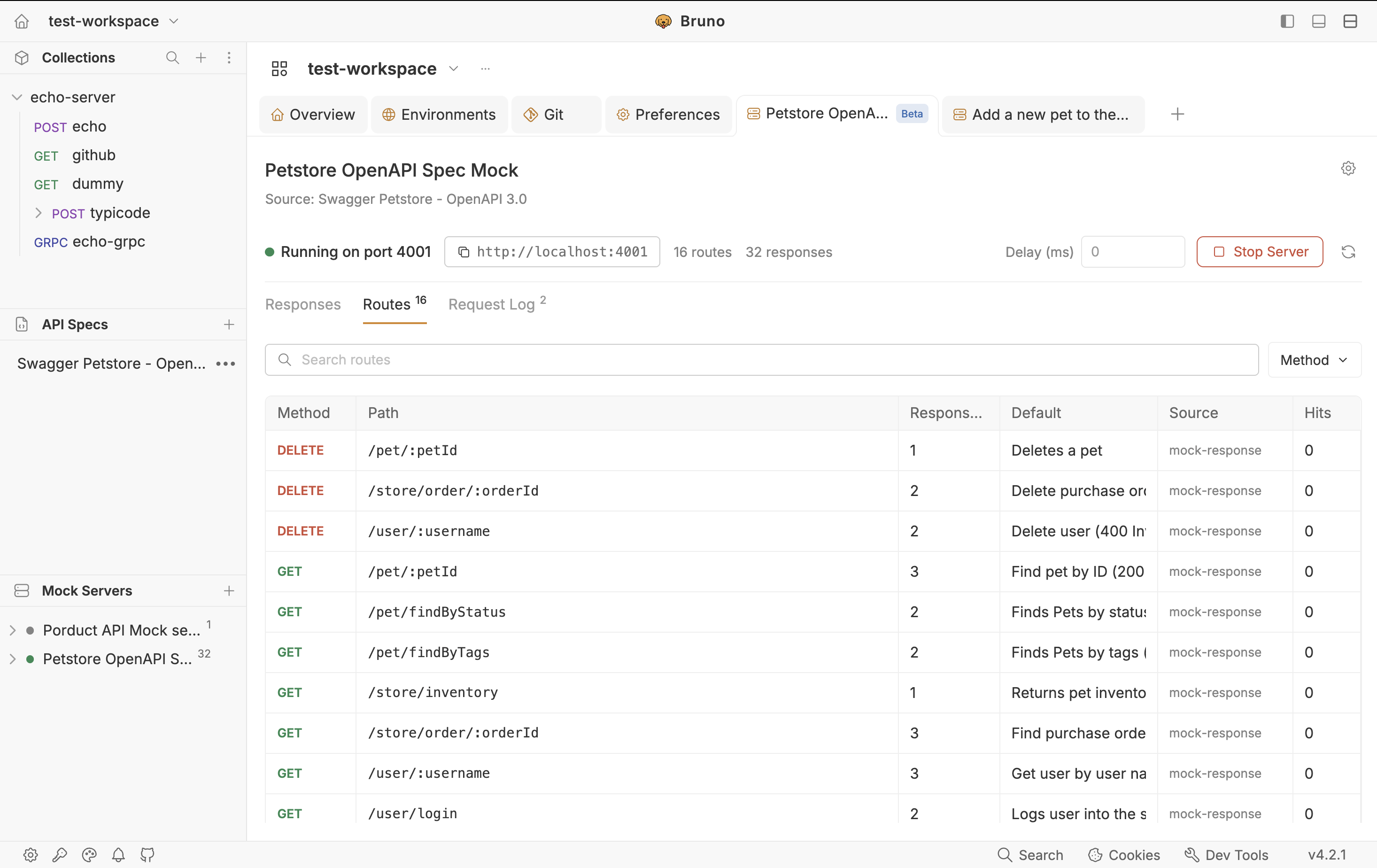
After generate, Routes is the map of the spec as HTTP: every registered method + path, how many responses sit on that route (watch this for 200+400 pairs), which is default, source (spec), and Hits while the server is running. Filter by method; copy the live URL when the server is up. If a client 404s, compare the client path to this table including :petId vs a hardcoded id.
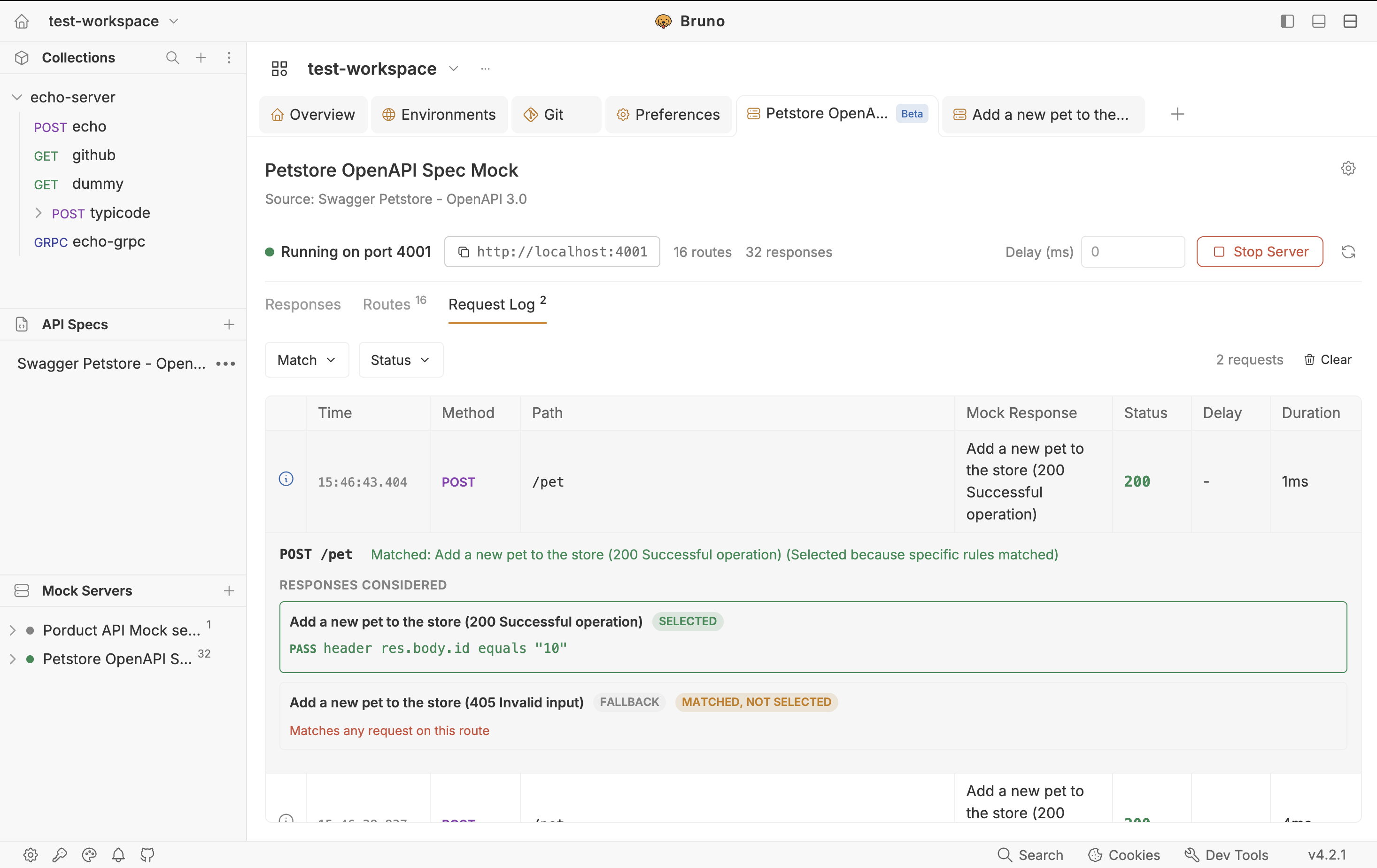
The Request Log lists every incoming call (newest first): time, method, path, which mock response was selected or No Match, status, delay, duration. Filter Matched / Unmatched / status families. It is in memory, last 500 entries per server — a debug aid, not an audit file in git.
Use the Match Trace Inspector (info icon on a row) when generate created two responses but you always get the default: you will see which rules passed or failed and the actual value received. Newest entries auto-expand. Full column lists match the collection guide and Request Log.
Wrap Up
When the contract lives in OpenAPI, you do not need to recreate every example by hand first:
- Enable API Spec (Features)
- Open your
.yaml/.jsonor practice on Petstore 3. - Create a mock linked to API Spec, click Generate from API Spec, then Start Server.
- Add rules wherever one path has several statuses. Confirm traffic on Routes and the Request Log. Use Sync with Spec when the file changes.
You get a local HTTP stand-in of the documented API enough for UI work and contract-shaped tests without standing up the real service. Prefer captured live payloads instead? Use the collection-and-examples flow in the companion post.