From Undocumented Legacy APIs to an Organized Bruno Collection Using AI

Editor’s note
This post by Alexandre Mendes was originally published on Medium and is republished here with permission. Read the original version here.
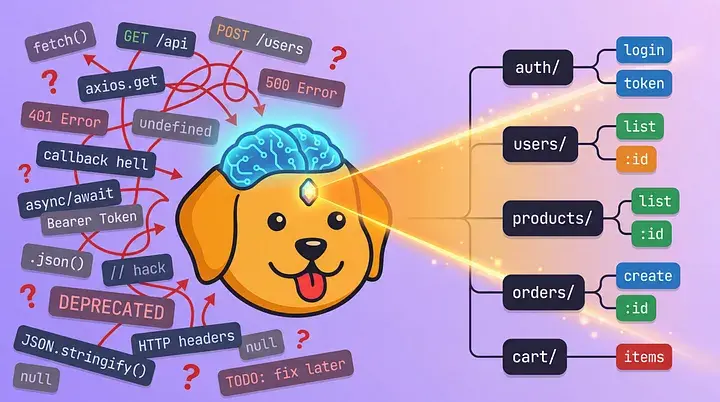
Imagine you just joined a project with multiple services, hundreds of API calls, and no documentation about what endpoints the application actually uses. You spend the first few days digging through the code, looking for fetch calls, tracing data flows, opening the Network tab, and clicking around, maybe asking a colleague who “knows the codebase”, only to find out this guy left the company six months ago. After 17 years of frontend architecture, I’ve seen this ritual repeat in almost every project I’ve touched.
Recently, I tried something different. Instead of going through the ritual again, I gave the codebase to an AI model and asked it to find every API call and organize them into a Bruno collection. Not a list of endpoints in a spreadsheet. An actual, executable collection where I could send requests, check responses, and test edge cases right away.
What is Bruno?
If you haven’t heard of Bruno, it’s an open-source API client similar to Postman, with one key difference: collections are stored as plain text files in your repo. No cloud sync, no account required. Your API documentation lives right next to your code, versioned in Git, readable by anyone with a text editor.
If you’ve ever spent time copy-pasting Bearer tokens between tabs, switching base URLs manually, or asking a teammate for staging credentials, Bruno solves all of that. It supports shared environments and session management out of the box. You configure your base URL, auth tokens, and session cookies, and every request in the collection inherits them. Log in once through the auth/login.bru request and Bruno captures the token and automatically injects it into every subsequent call, using local variables to share it.
This makes Bruno the perfect target for AI-generated output: the format is simple, file-based, and human-readable. You can review, commit, and share it with your team instantly. And because environments are also just files, your whole team shares the same configuration through Git.
The Prompt
All you need is any AI model (ChatGPT, Claude, Gemini, or even a local one) and Bruno Desktop installed (docs here). Point the AI model at your project and ask it to extract all API interactions into Bruno format.
I tested this prompt on both legacy and modern projects: some that already had a Bruno collection and others starting from scratch. It works every time. If a collection exists, the AI audits and improves it. If not, it generates one from zero.
Here’s a sample to give you an idea of how it works:
Scan this entire project and find every HTTP API call (fetch, axios,
GraphQL, etc.). For each one, extract the method, URL, headers, body,
and query parameters.

Then generate a Bruno collection: group endpoints by feature, create
environment files from the project config, set up auth token capture
in post-response scripts, and output .bru files I can drop into my repo.
That’s enough to get started. The AI fills in the gaps.
After running this across several codebases, I kept hitting the same edge cases: path parameters being hardcoded, tokens using the wrong variable name, and environment files being created for environments that don’t exist. So I built a detailed version of the prompt that handles all of that.
Grab the full prompt in the GitHub Gist, including rules for collection structure, authentication capture, environment generation, and documentation format. Star it and save it for later. I keep updating it as I find new issues, so it’s always the latest version.
What You Get
After running the prompt, you’ll get something like this. Each .bru file is plain text with a simple, readable structure.
bruno/
├── bruno.json
├── environments/
│   ├── local.bru
│   ├── staging.bru
│   └── production.bru
├── auth/
│   ├── login.bru
│   ├── logout.bru
│   ├── refresh-token.bru
│   └── get-current-user.bru
├── users/
│   ├── get-user-by-id.bru
│   ├── update-user-profile.bru
│   └── list-users.bru
├── products/
│   ├── get-products.bru
│   ├── get-product-by-id.bru
│   ├── search-products.bru
│   └── update-inventory.bru
└── orders/
    ├── create-order.bru
    ├── get-order-status.bru
    └── list-orders.bru
Shared configuration: login once, use credentials everywhere.
Environments
One of the biggest wins is how environments tie everything together. The AI generates environment files that hold your base URLs, and you just add your credentials. Every .bru file in the collection references , so switching between local, staging, and production is a single dropdown click. No find-and-replace across all your requests.
# environments/local.bru
vars {
  baseUrl: http://localhost:3000/api/v1
}
vars:secret [
  token
]

# environments/staging.bru
vars {
  baseUrl: https://staging-api.yourcompany.com/api/v1
}
vars:secret [
  token
]

# environments/production.bru
vars {
  baseUrl: https://api.yourcompany.com/api/v1
}
vars:secret [
  token
]
Authentication
The auth/login.bru request can include a post-response script that captures the token and stores it for every other request:
meta {
  name: Login
  type: http
  seq: 1
}

post {
  url: /auth/login
  body: json
  auth: none
}

body:json {
  {
    "email": "dev@yourcompany.com",
    "password": ""
  }
}

script:post-response {
  bru.setEnvVar("token", res.body.token);
}
Now every other request in the collection uses that token automatically:
auth:bearer {
  token:
}
Hit login once, and every endpoint in your collection is authenticated. New engineer joins the team? They clone the repo, open Bruno, hit login, and they’re using every API in the system within minutes. No Postman workspace invites, no expired shared tokens, no “ask a colleague for the staging credentials.”
The Real Value
This is not just about saving time, though going from days to minutes matters. It’s about changing how teams approach legacy projects.
When you commit a Bruno collection to your repo, you’re giving every new engineer a living, testable map of every API the application touches. They don’t need to read the code to understand what the app does. They can open Bruno, see every endpoint grouped by feature, and start testing immediately.
In my experience dealing with platforms at large enterprises, this kind of instant visibility is what separates teams that move fast from teams that spend their first two weeks getting up to speed.
Going Further: Iterate and Improve
The prompt I shared above is a starting point, not a finished product. I refined it over multiple iterations, testing against real projects and fixing issues as they came up: missing Content-Type headers, authentication not being captured correctly, and documentation blocks left empty. Your project will have its own quirks, and the prompt is designed to be adapted.
Here’s how to get the most out of it:
- Run it periodically to catch new endpoints that were added.
- Diff the output against your existing collection to spot undocumented APIs.
- Run it on existing collections for even better results. It preserves your naming conventions, documentation depth, and patterns, filling in the gaps instead of reinventing the wheel.
For engineers who have never used Bruno, this workflow gives you a fully organized, testable API collection in minutes. You get a tool and documentation at the same time.
For teams already using Bruno, this is a way to audit and improve what you have, catch undocumented endpoints, and standardize patterns across the collection.
Treat the prompt as a living document. Run it, review the output, add a rule to fix what’s wrong, and run it again. That feedback loop is where the real value comes from.
Try It In Your Project
Pick any project with undocumented APIs. Use the sample prompt above or grab the full version from the Gist. All you need is any AI model and Bruno Desktop. The messier the project, the more useful the output.
Once your Bruno collection is committed to the repo, any new engineer can clone it, open Bruno, and start testing APIs right away. No more digging through code to figure out what the project does. Just organized, live documentation that your team will actually use.
About the author
Alexandre Mendes is a Senior Frontend Engineer and Technical Architect with over 17 years of experience building platforms for Fortune 500 companies. He specializes in micro-frontend architecture, scalable component systems, and AI-powered development.