

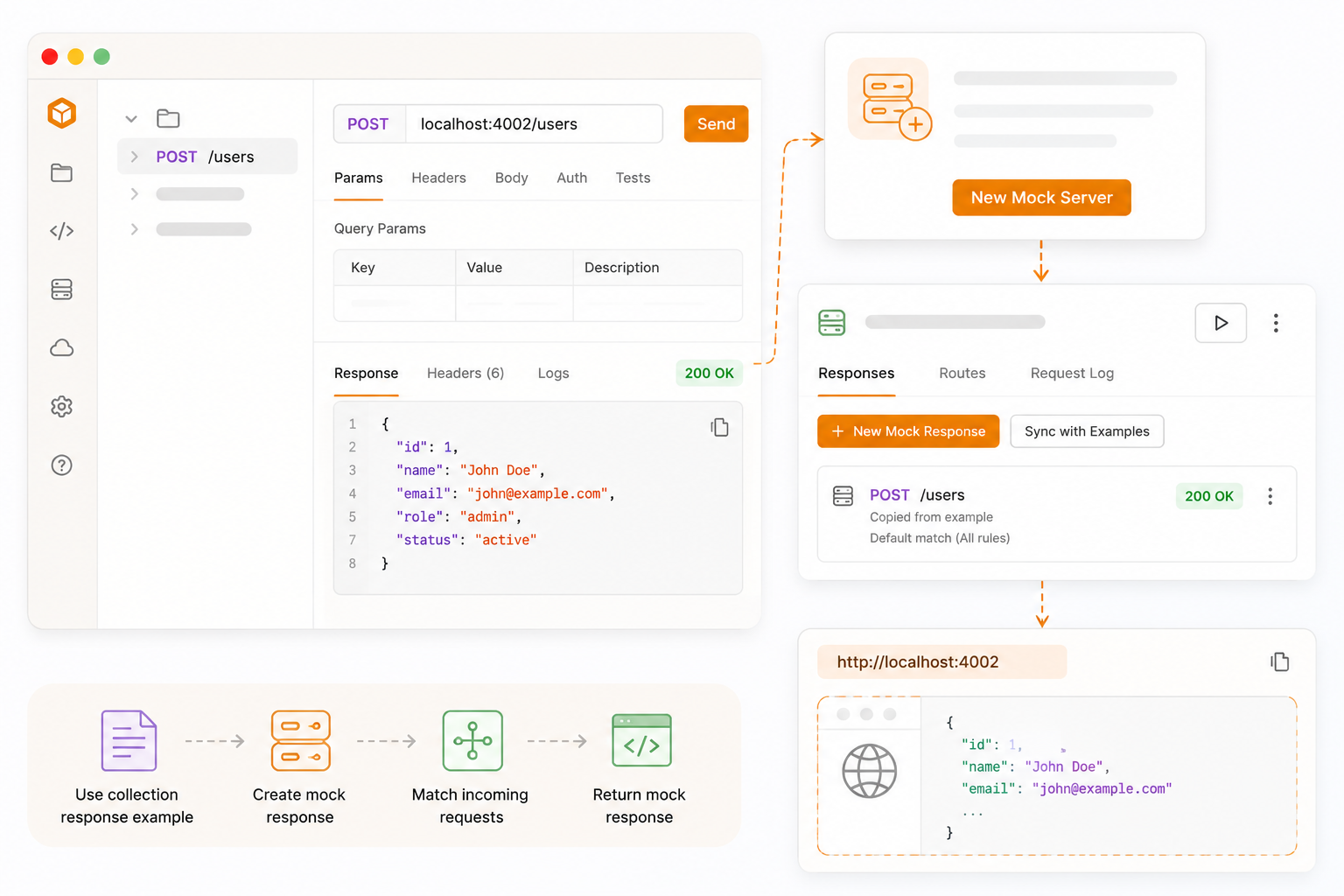
Frontend work, integration tests, and demos often need a stable API before the real backend is ready or while it is down, rate-limited, or still changing. A mock server fills that gap. It listens on your machine, pretends to be the API, and returns the status, headers, and body you already defined. The client does not know the difference: it still sends GET /users/1 to a URL. Bruno just happens to be the process answering on localhost.
This guide is the collection-and-examples path: save response examples in Bruno, turn them into a local mock, then learn the dashboard, Responses, rules, Routes, and the Request Log. A follow-up post will cover generating the same kind of mock from an OpenAPI spec. Official reference: Mock Servers overview, create, run, and the collection tutorial.
Mock Servers are in Beta
The Mock Servers section appears in the sidebar. Share feedback on GitHub Discussions.
Table of Contents
- Why Mock Servers Exist
- What Is a Mock Server?
- What Is a Response Example?
- How to Save Response Examples in Bruno
- Enable Mock Servers in Bruno
- Create a Mock from Saved Examples
- Where Bruno Stores Mock Servers
- The Responses Tab
- The Response Editor: Rules, Demo Request, and Try
- The Routes Tab
- The Request Log
- How the Running Server Behaves
- Wrap Up
Why Mock Servers Exist
In a real product, the UI and the API rarely ship on the same day. The frontend needs GET /orders to return a list, an empty state, and a validation error. The backend for those cases may still be unfinished, behind a VPN, or too expensive to hit from every developer laptop. Waiting is slow. Pointing the UI at production is unsafe. Hand-writing a Node server for every endpoint is extra work you will throw away.
A mock server is a stand-in for the real backend. You decide the contract method, path, status, headers, body and a process on your machine serves that contract to anyone who calls it: Bruno itself, a React app, a mobile emulator, or a CI job.
A mock is not a full backend. It does not persist data, run business logic, or replace a staging environment. It answers with the responses you configured. That is enough for a surprising amount of day-to-day work.
What Is a Mock Server?
In Bruno, a mock server is a local HTTP server you start from the app. Clients send real HTTP requests to a base URL such as http://localhost:4000. Bruno matches the method and path (and optional rules), then returns the mock response you defined.
You can create a mock in three ways. This post covers the first:
| Source | When to use it |
|---|---|
| Collection (saved examples) | You already have requests and examples in Bruno. Sync once; each example becomes a mock response. |
| OpenAPI spec | You have a spec in the workspace. Generate routes from operations and schemas. Covered in a follow-up post. |
| Standalone (manual) | No collection or spec. You add responses yourself on the Responses tab. |
What Is a Response Example?
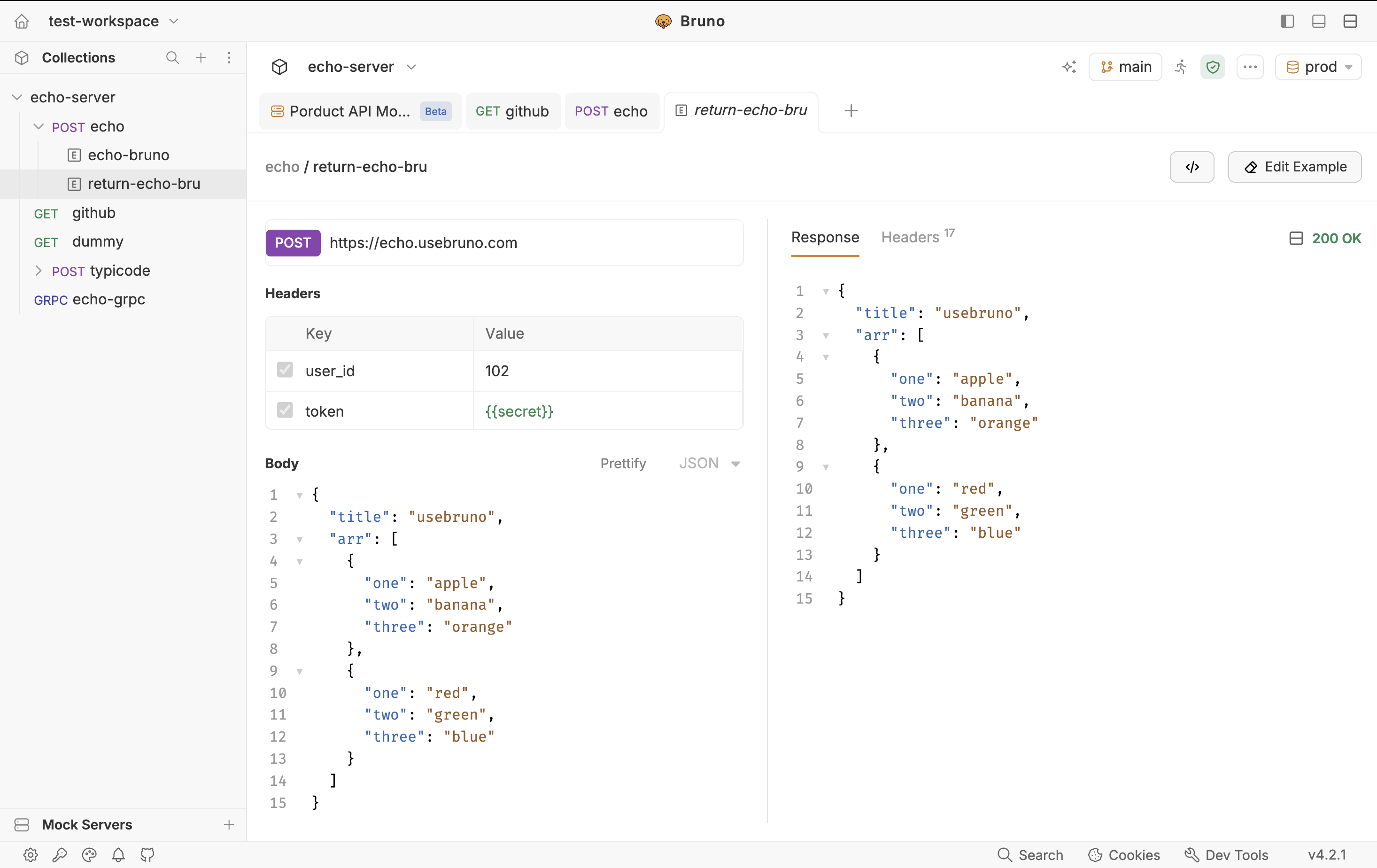
A response example is a saved snapshot of how an API behaves for one case: success, validation error, empty list, not found, and so on. In Bruno it lives as a nested item under the parent request in the sidebar not as a separate collection cluttering the tree.
Each example stores:
- Request details - used for that case params, headers, and body
- Response data - status, body, and response headers
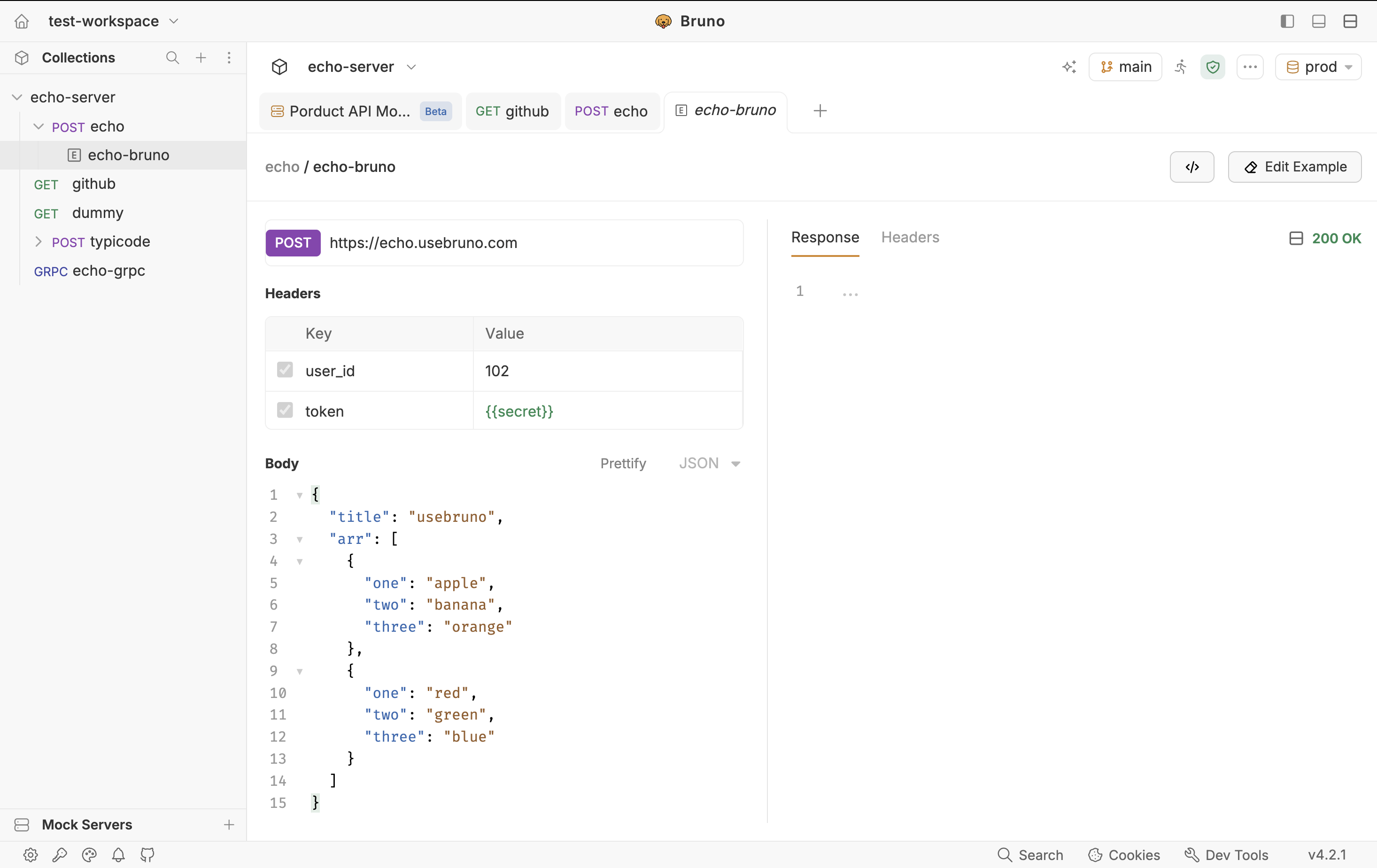
Examples are documentation first. They are read-only as executable requests: you inspect them, you do not “Send” them like the parent. When you later sync a mock server, those snapshots become the payloads the local server returns.
Mental model: the parent request is “how I call the API.” Each example is “one way the API answered.” The mock server is “serve those answers on localhost.” Save at least one example per route you plan to mock. Multiple examples on the same method and path become alternative mock responses once you add rules.
How to Save Response Examples in Bruno
You do not need a live backend to create every example. Bruno supports two paths: write the payload yourself, or capture a real response after you send the request. Use whichever matches the moment.
Create an example without sending a request
Use this when you already know the status, headers, and body you want the API is not up yet, you cannot reach staging, or you want an error payload that is hard to trigger live.
Open the collection and select the request that owns this route (for example GET /users/:id).
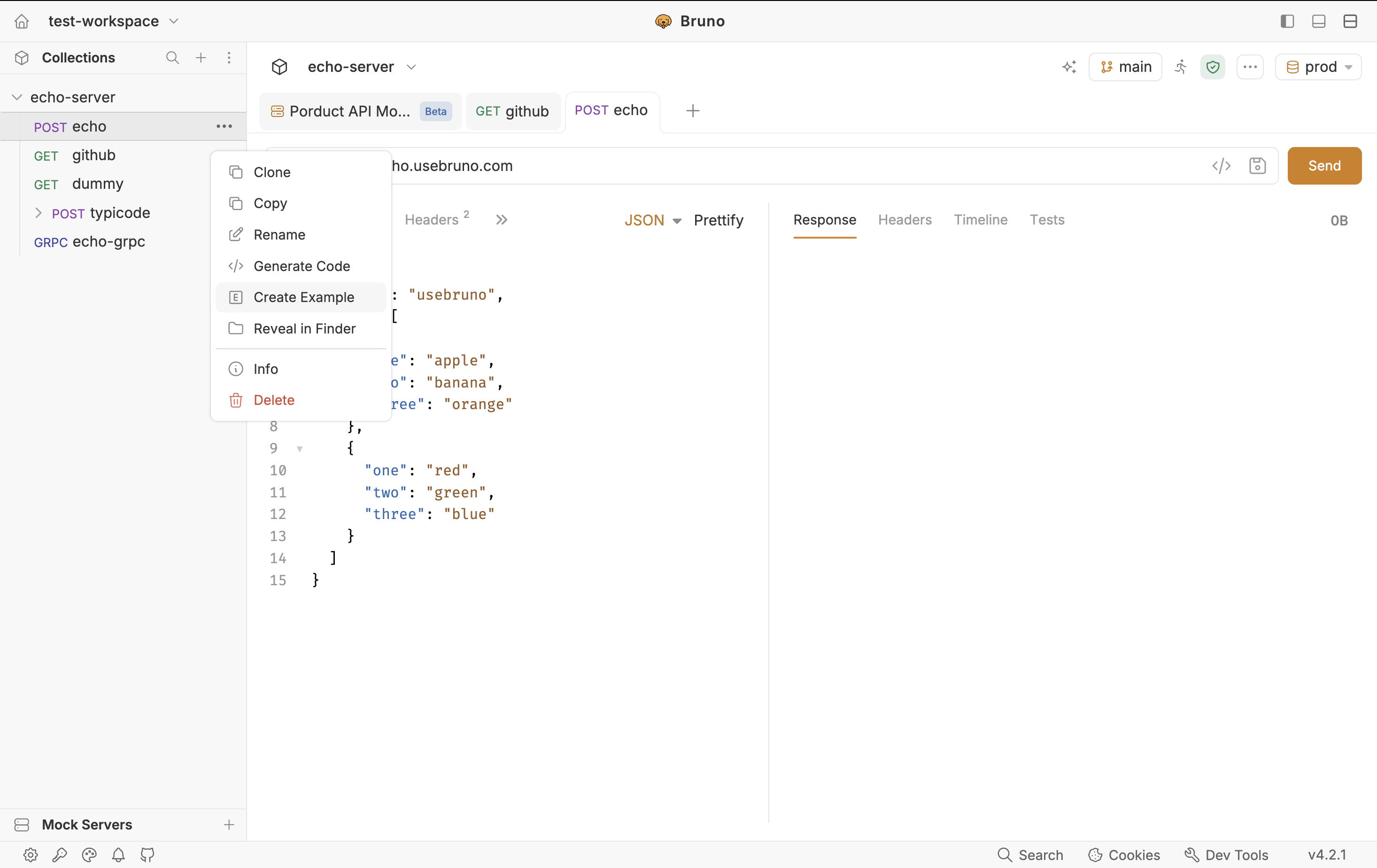
Open the request’s context menu (⋯) and choose Create Example.
Enter an Example name, optional description, status code (defaults to 200 OK), and body type (defaults to JSON).
Click Create Example. The example appears nested under the request. Fill in the body and headers to match the case you want to mock.
Give examples names that describe the case, not the endpoint: 200-user-found, 404-missing-user, 400-invalid-email. After sync, those names show up as mock responses.
Save a live response as an example
Use this when the real API is reachable and you want a faithful copy of what it actually returned including headers.
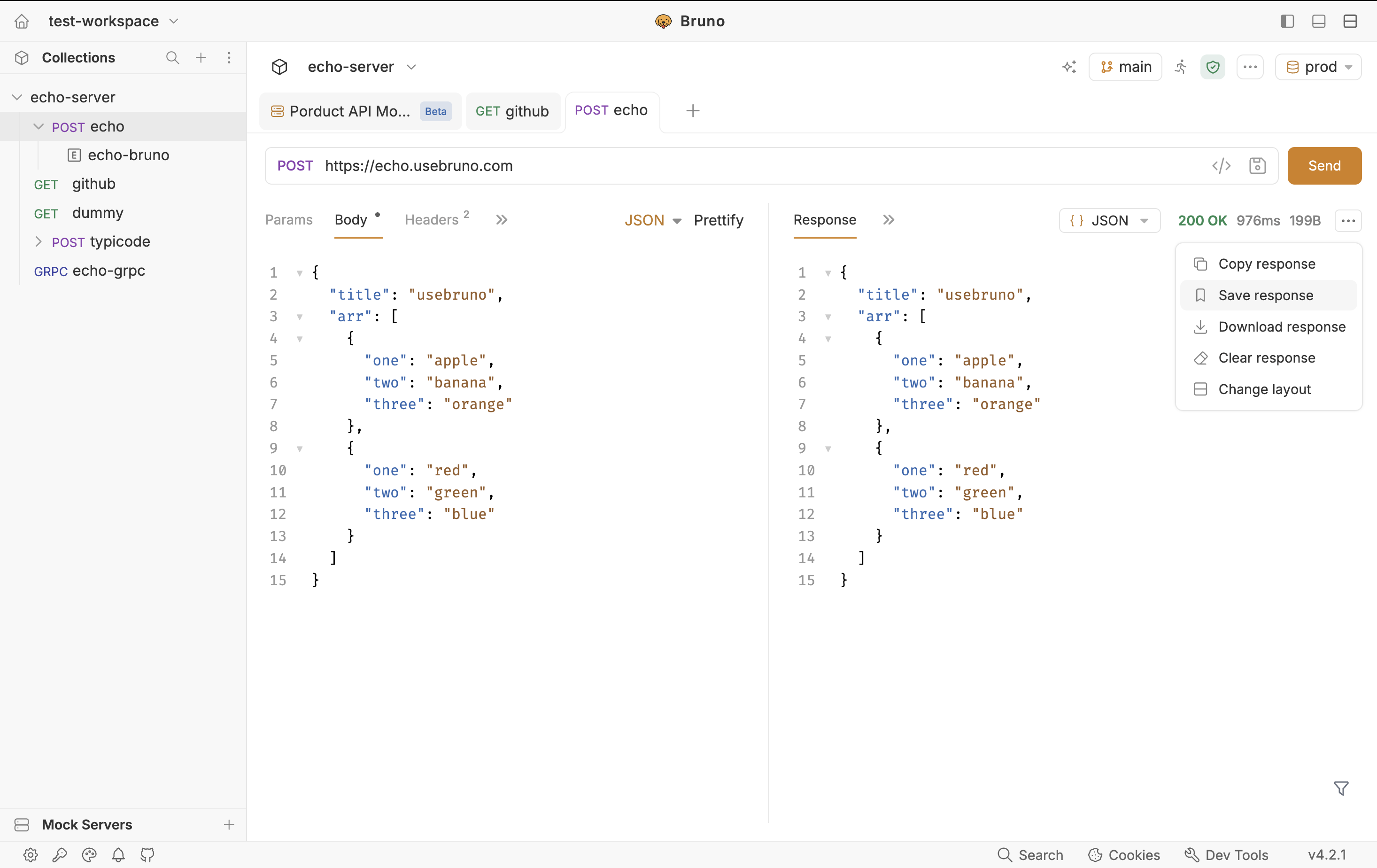
Send the request and wait for the response.
In the Response tab, click the Save Response (bookmark) icon in the top-right.
Name the example and click Save. It nests under the request like any other example.
The saved example’s request pane still shows Params, Headers, and Body from that call. The response pane shows the captured body and headers. Full details: Response Examples.
Create a Mock from Saved Examples
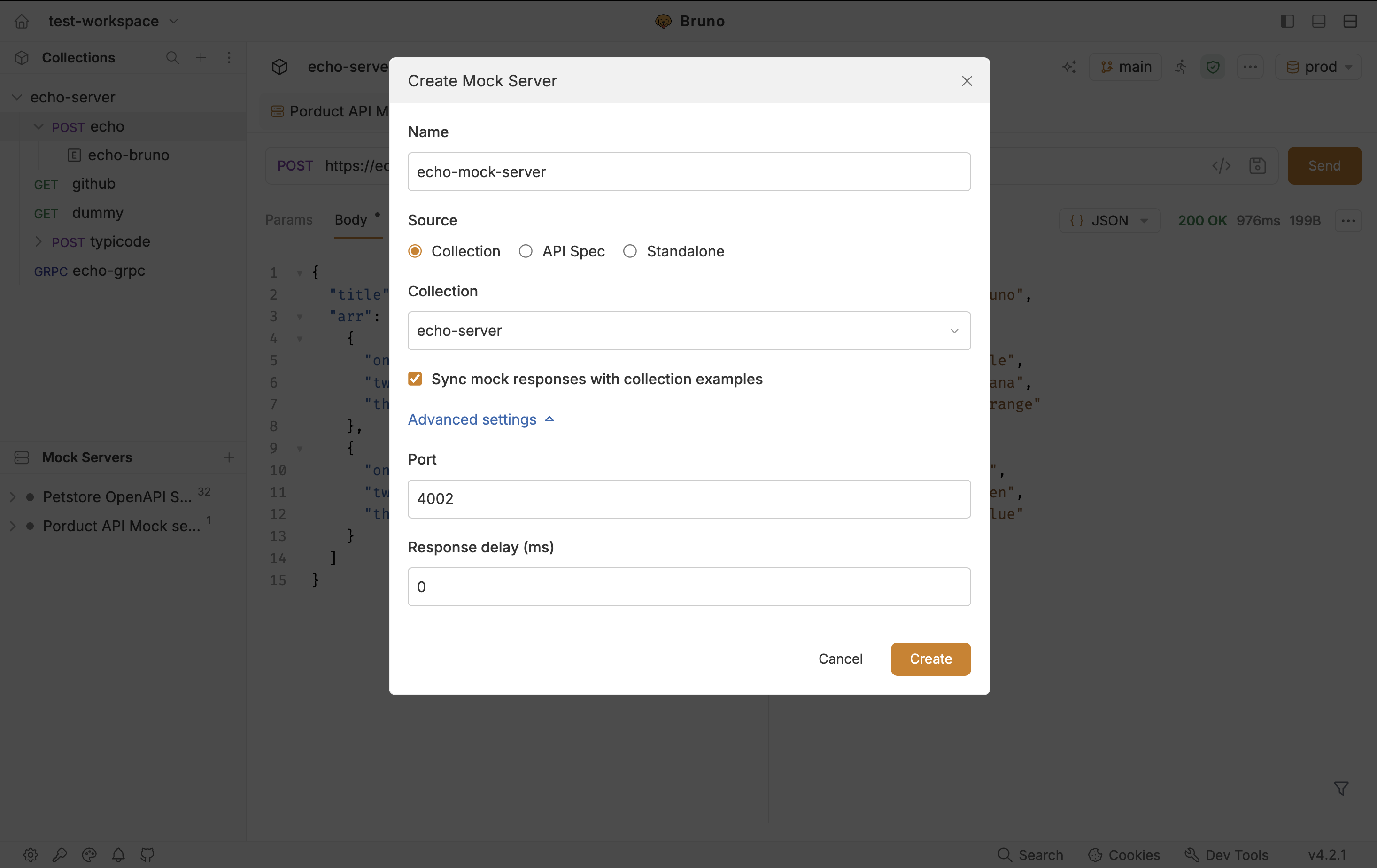
Step 1: Create the mock server
In the sidebar, expand Mock Servers and click +.
Enter a Name.
Keep Sync mock responses with collection examples checked, select Collection, pick the collection that holds your examples, then click Create.
Optionally open Advanced settings to set Port and Response delay before you create.
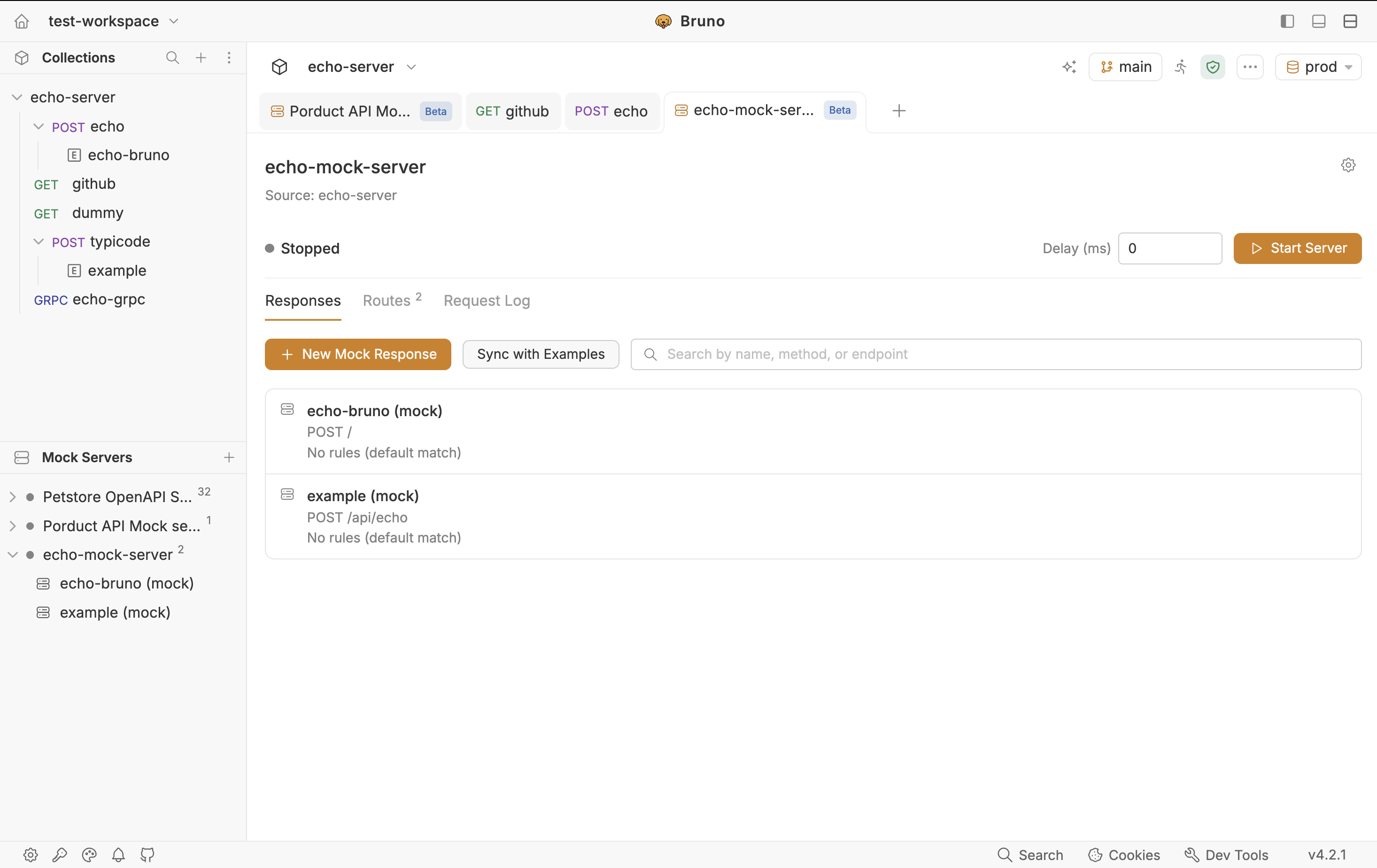
Bruno opens the mock dashboard as its own tab (not a request tab). The header shows the name, source collection, a grey status dot while stopped, Start Server, delay, and a gear icon for settings.
Step 2: Mock Servers Dashboard
On the dashboard, click Sync with Examples. Bruno copies every saved example in the linked collection into mock responses: method, path, status, headers, and body. They appear on the Responses tab. Search by name or path if the list is long.
Sync again after you add or change examples in the collection so the mock stays aligned. Syncing from examples is how the collection remains the source of truth.
Step 3: Start the server
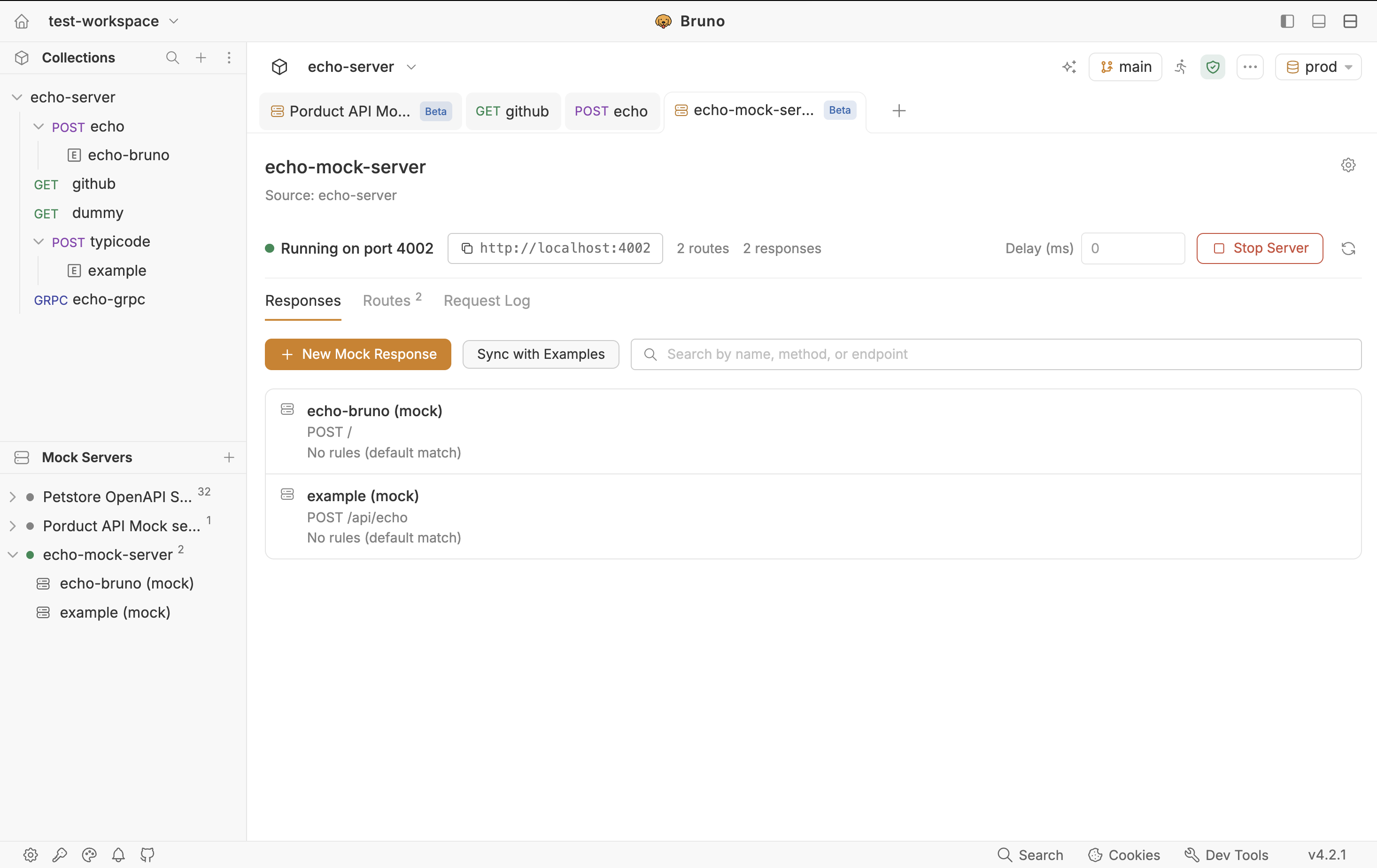
Click Start Server in the dashboard header. Bruno starts at port 4000 by default and increments if that port is taken for a new mock. If the configured port is already in use when you start, the server will not start; change it under Mock Server Settings (gear) → Advanced settings. After it is running you get a green status dot, the port, a copyable base URL, Stop Server, live route/response counts, and optional delay.
Any client can now call, for example:
curl http://localhost:4000/users/1Or set your app’s API base URL to that same origin. You can also use Try on a mock response, or Open a New Request, without leaving Bruno.
Where Bruno Stores Mock Servers
Mock servers are workspace files, not a cloud resource. They live at the workspace root in a mocks folder, one YAML file per mock:
workspace
└── mocks
    ├── users-api.yml
    └── payments-api.yml
A collection-linked file records the mock name, port, source collection path, and each route’s request, response, optional rules, and where it was copied from. Commit this folder with the rest of the workspace so the team shares the same mocks. The Request Log is not stored here, it is in-memory only (see below).
Shape of the file (trimmed to the idea, not a full dump):
info:
  name: users-api
  type: mock

mock:
  port: 4000
  source:
    type: collection
    path: /absolute/path/to/collection

routes:
  - name: 200-user-found
    request:
      method: GET
      url: /users/:id
    response:
      status: 200
      statusText: OK
      headers: []
      body:
        type: json
        data: '{"id":1,"name":"Ada"}'
    rules:
      operator: AND
      conditions: []
The Responses Tab
This is where you manage what the mock can return. The toolbar always includes New Mock Response. For a collection-linked mock you also get Sync with Examples.
New Mock Response is not limited to synced examples. You can add a route that never existed as a collection example. Optionally copy from a collection example so you start from a request you already have instead of a blank method and path.
Each mock response is a first-class object with:
- Method and Path - path parameters use
:name, for example/users/:id - Status and Headers
- Expected body (JSON, HTML, text, or XML) with syntax highlighting
- Rules - optional conditions that pick this response over another for the same method + path
- Demo Request, Try, and Open a New Request
- Edit and Delete in the top-right of the editor
The Response Editor: Rules, Demo Request, and Try
Open a mock response and you get two jobs on one screen. The left side answers when this response is returned. The right side answers what is returned (Expected body, Headers, status) plus Try Result after you send a probe.
Why rules exist
Method + path alone is not enough when one URL has several stories. POST /users might return 201 for a valid body and 400 when email is missing. Rules attach conditions to a response so Bruno can choose the right one.
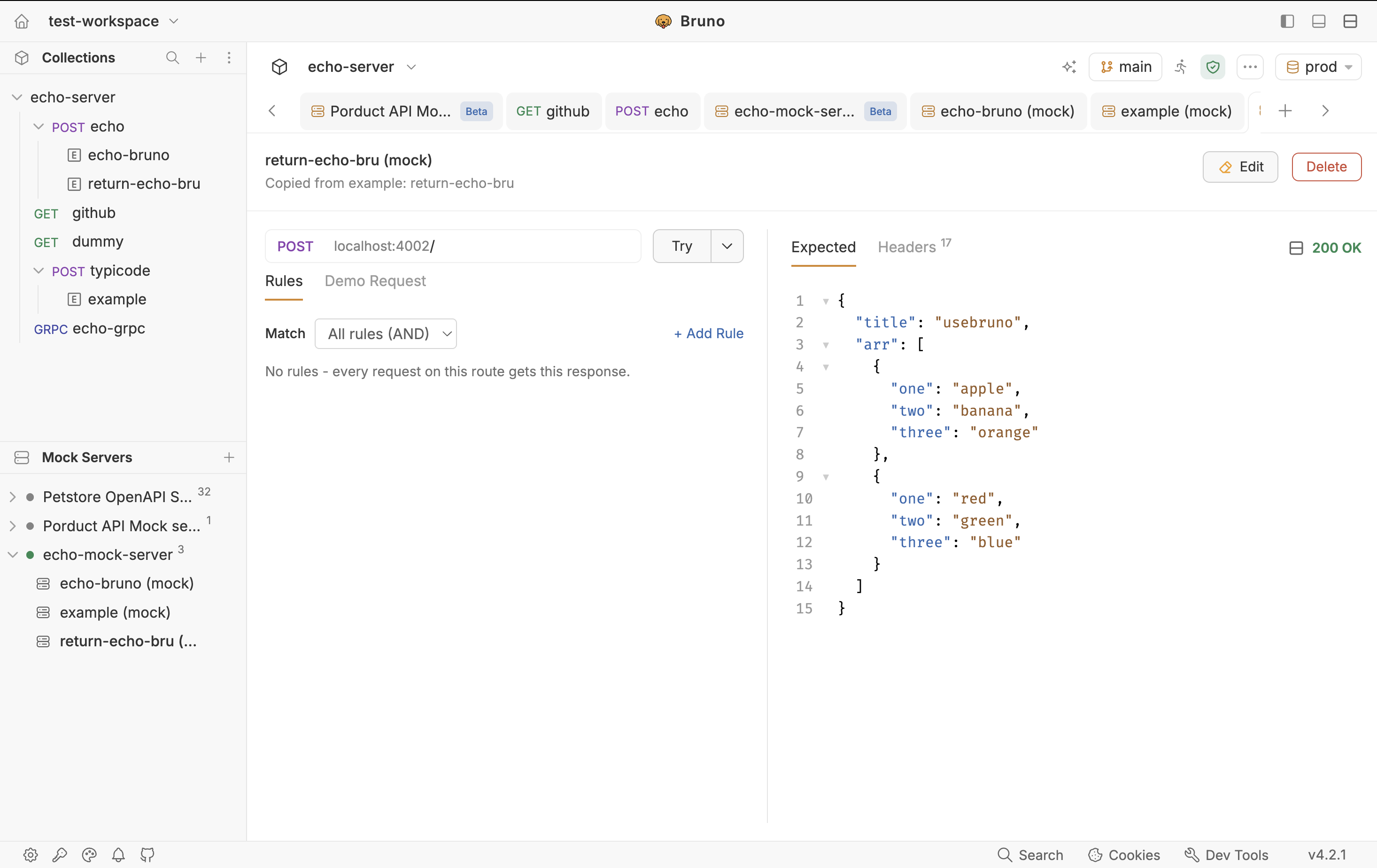
Click Add rule or Edit. The Rules and Demo Request tabs appear. Changes apply only after you click Save.
| Field | What it means |
|---|---|
| Target | Which part of the incoming request to inspect: header, query, or body. |
| Key | The name to check — a header name, query param, or a body property path. |
| Operator | How to compare: equals, not equals, contains, matches, and similar. |
| Value | The value that should match for this response to be selected. |
| Match | All rules AND (default): every condition must pass. Any rule OR: one pass is enough. |
For nested JSON, use a dotted path with or without a $ prefix. Both user.type and $.user.type work. Array indexes and advanced JSONPath filters are not supported yet.
Example: two responses on POST /users. Incoming body:
{
  "user": {
    "type": "admin"
  }
}
On the admin success response, add:
| Target | Key | Operator | Value |
|---|---|---|---|
| Body | user.type |
equals | admin |
When user.type is admin, Bruno returns that response. Put a different rule (or no rule, as a fallback/default) on the other response for guests or invalid payloads.
Demo Request
Demo Request is generated from the rules you defined. It is an example of a request that would select this mock response — for instance a header testing: header if you added that rule. You do not hand-write it to “register” the route; it is there so you can see what matching looks like and reuse it.
Try and Open a New Request
With the server running, Try sends a real request to this route. Rules still apply. The result shows in Try Result and is also written to the Request Log. Open a New Request opens a Bruno request tab pre-filled with the demo (method, path, body) so you can keep iterating like any other collection request.
The Routes Tab
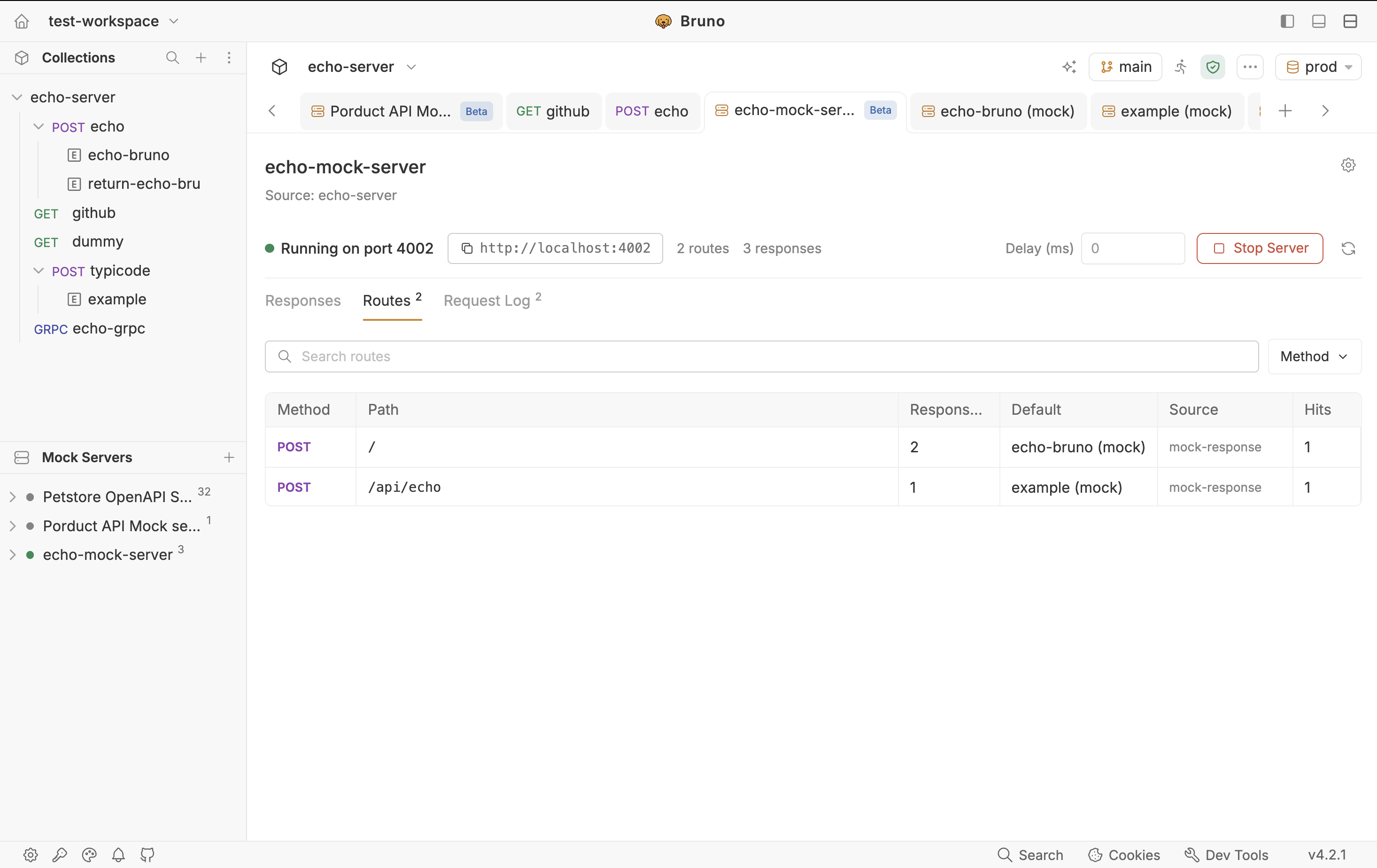
Routes is a read-only table of every registered method + path. Use it to confirm what is actually mounted — especially after a sync and to spot duplicates.
| Column | What it shows |
|---|---|
| Method | HTTP method. Filter dropdown lists only methods that exist on this mock. |
| Path | The route path. When the server is running, copy the full URL from here. |
| Responses | How many mock responses share this method + path (rules pick among them). |
| Default | Which response is the default for that route. |
| Source | Collection, spec, or standalone. |
| Hits | How many times this route was called while the server has been running. |
Search works across columns. If a client 404s, check Routes first: is the path registered, and did you use :id in the mock but {id} in the client?
The Request Log
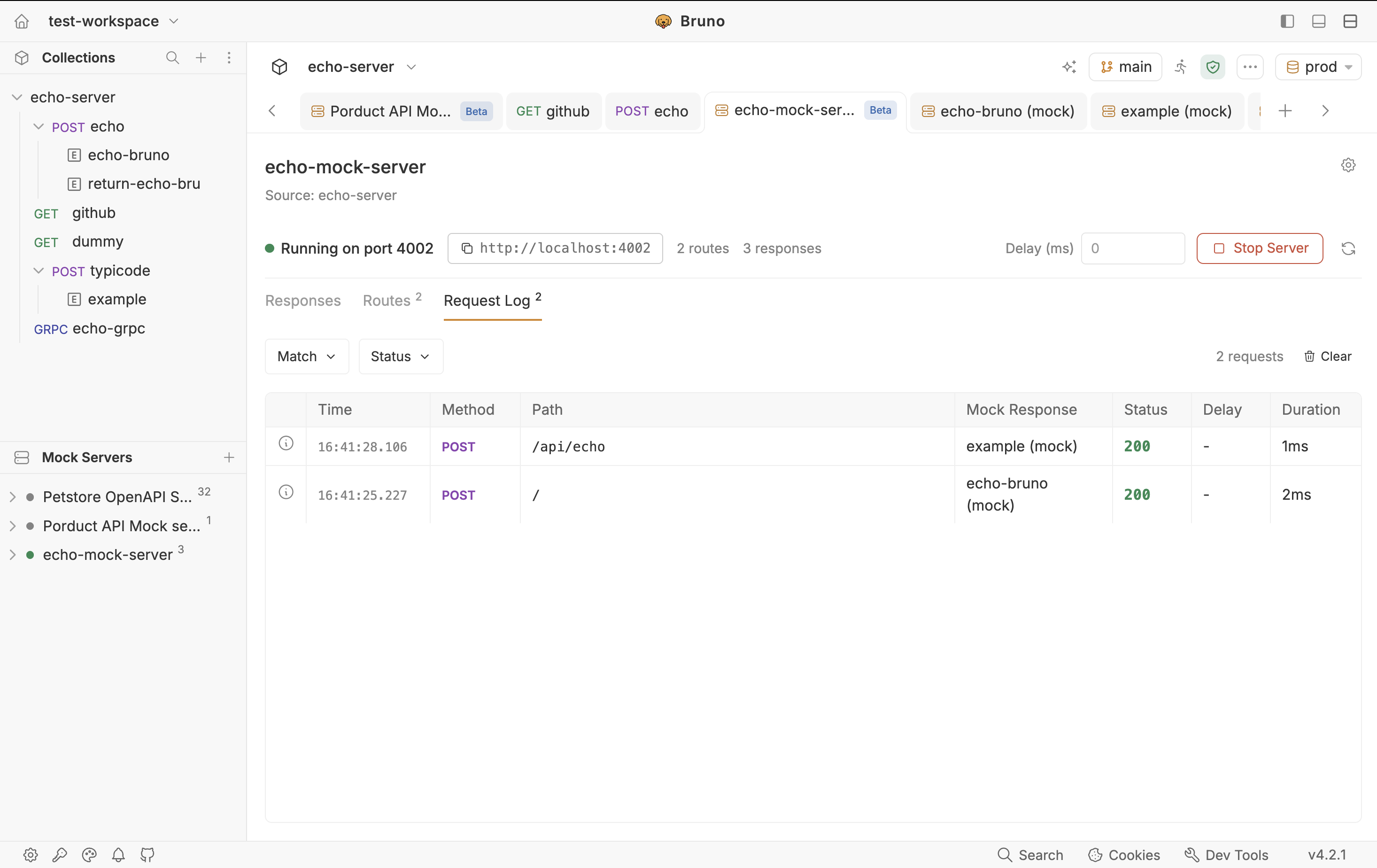
While the server is running, every incoming request is listed live, newest first. This is a debugging aid, not an audit log: it lives in memory, keeps the most recent 500 entries per server, and is cleared when you stop the process or click clear.
| Column | What it shows |
|---|---|
| Time | When the request arrived. |
| Method / Path | What the client actually sent. |
| Mock Response | The selected response name, or No Match. |
| Status | Status code Bruno returned. |
| Delay / Duration | Configured delay (if any) and total time to serve. |
Filter by match status (Matched, Unmatched, All Requests) or by status family (2xx, 3xx, 4xx, 5xx).
Match Trace Inspector
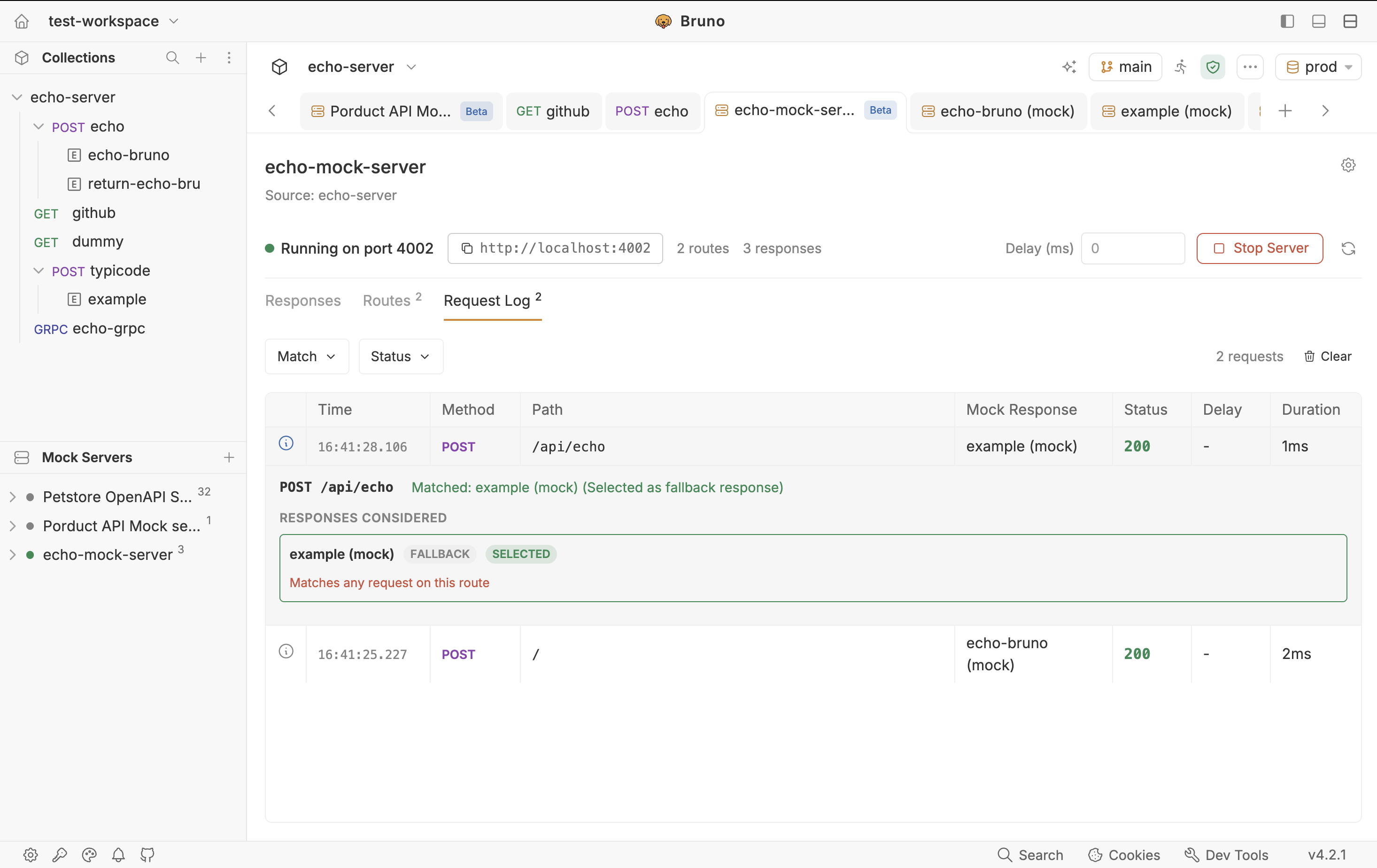
Each row has an info icon that opens the Match Trace Inspector. This is the answer to “why did I get the guest payload?” or “why 404?”
- Every mock response considered for that route
- Each rule, whether it passed or failed, and the actual value received (for example got
guest) - Which response was selected and why — specific rules, or fallback/default
- For unmatched requests, a list of registered routes so you can spot a missing mock
The newest log entry auto-expands the inspector so you can debug immediately after Try or a call from your app.
How the Running Server Behaves
A few details that surprise people the first time:
- CORS is on by default. Browser apps can call the mock.
OPTIONSpreflight returns204with the right headers. - Trailing slashes are normalised.
/users/and/usersboth match. - Unmatched paths return 404 with a JSON body: method and path tried, a hint to create a matching mock, and a truncated list of registered routes. That payload is meant to be read, not hidden.
- Delay in the header adds fixed latency to matched responses only. Unmatched routes are never delayed.
- Refresh re-reads the source and rebuilds the route table without dropping the port.
- If configured and running ports differ, the header warns: “Configured port N differs from the running port N.”
- Renaming, deleting, or moving the source collection on disk is picked up on the next tick without stopping the server.
Port already in use: Bruno reports whether the conflict is another Bruno mock or some other process. Fix it in gear → Advanced settings, then start again. Do not assume a silent fallback to a random port unless you created a new mock that auto-incremented from 4000.
Wrap Up
The whole loop is short once you have seen it once:
- Save examples on your requests from scratch, or from a live response.
- Create a mock linked to that collection, Sync with Examples, then Start Server.
- Point any client at the copied base URL. Use Rules when one path needs more than one body. Use Routes and the Request Log (and Match Trace) when something does not match.
You now have a local stand-in for the backend, backed by the same examples your collection already uses for documentation no extra host, no terminal server of your own. Next, we will cover generating the same kind of mock from an OpenAPI spec when the collection is not the source of truth yet.