


For most collections, script conversion is automatic. Import a Postman collection into Bruno and the pre-request scripts and tests come across already translated, the collection runs, and you are done. This article is for the other cases.
Postman exposes a pm.* API and Bruno exposes bru, req, and res. Our translator maps the common calls during import, and that covers the large majority of scripts we see. A small number of collections use something the map does not cover: an older Postman API, a pm.sendRequest flow with a hand-rolled callback, a library Postman bundled, or a call with no Bruno equivalent. Those lines stay in your scripts exactly as written and throw at runtime until you fix them.
This guide is about that last mile. We cover what carries over from a Postman export, how to import collections and environments, how our script translator works, a repeatable workflow for finding and fixing the lines it could not translate, and copy-paste fixes for the conversion issues we see most often. If you only want the click-through, our Postman to Bruno migration guide covers it. Stay here if a script did not convert cleanly.
What carries over from Postman, and what needs your attention
Almost everything structural imports without help. The items that need a second look are scripts, variable names with unusual characters, and anything that depended on Postman's runtime.
| Postman | Where it lands in Bruno | What to check |
|---|---|---|
| Folders and requests | Folders and request files in the collection (YAML) | Nothing. Order and nesting are preserved. |
| Auth (Basic, Bearer, API Key, Digest, OAuth 1.0, OAuth 2.0, AWS Sig v4, NTLM, Akamai EdgeGrid) | Auth tab at request, folder, and collection level | Inherited auth keeps working. Re-enter any secrets Postman did not export. |
| Body (raw JSON/XML/text, form-data, urlencoded, GraphQL) | Body tab; GraphQL bodies become GraphQL requests | File fields in form-data need the file re-attached. |
Path variables (:id) and query params |
Path params and query params | Nothing. |
| Saved example responses | Response examples on each request | Nothing. |
| Request settings (follow redirects, max redirects, URL encoding, disabled system headers) | Request Settings | Nothing. |
| Collection variables | Collection variables | Imported as strings; non-string values in the export are serialized. Set the type to number, boolean, or object in Bruno afterwards where a script or body expects one. |
| Environments | Collection environments, imported separately | Names and keys keep only letters, digits, -, _, and .. Anything else becomes _. Postman secret variables import as Bruno secrets. Values import as the string type; set number, boolean, or object types afterwards where scripts expect them. |
| Globals | A global environment, imported separately | Same string and naming rules as environments. |
| Pre-request scripts (request, folder, collection) | Pre Request script at the same level | Translated. Anything the translator skipped is left as-is and needs a fix. |
| Test scripts (request, folder, collection) | Post Response script at the same level | Translated. pm.test blocks become test() blocks that run after the response. |
pm.require() and require() packages |
Install packages prompt after import | Some libraries need Developer Mode. Postman-only packages have no equivalent. |
Two details trip people up more than the rest. First, Postman exports the initial value of each environment variable, not the current value, so make sure the values you rely on are persisted before you export. Second, a variable whose name changes on import (for example api/base-url becoming api_base-url) is still referenced by its old name in URLs and scripts. Search the collection for the old name and update every reference.
Step 1: Export from Postman and import the collection
If Bruno is not installed yet, grab it from our downloads page first. The import itself is five clicks. The one setting that matters for scripts is the Preserve scripts toggle, which is off by default and should stay off unless you plan to rewrite every script by hand.
-
In Postman, open the collection menu (the
···next to its name), choose Export, pick Collection v2.1, and save the JSON file. v2.0 exports work too if you happen to have an older export. -
In Bruno, click the + button in the top-left corner and choose Import Collection. Drag the JSON file in or browse to it.
-
Choose the folder where the collection will live on disk and click Import. Bruno writes the collection as a folder of YAML files, which is what you might commit to Git.
-
If any script referenced an npm package, an Install packages prompt appears after the import. It sorts what it found into up to three groups: packages Bruno can install into the collection folder for you, libraries that need Developer Mode, and Postman-only packages with no Bruno equivalent. We come back to this prompt in the debugging section.
Migrating a whole workspace at once. Export a data dump from Postman (Settings, then Data, then Export Data) with collections, environments, and globals selected. Import the zip through the same Import Collection dialog, untick anything you do not want, and pick a destination. Bulk import is part of the Ultimate Edition or a free trial. If the dump is large or messy, the Postman Export Organizer can help to group by workspace and flag duplicates before you import.
Converting from a script. The import dialog runs the @usebruno/converters package, and you can call it yourself when you have dozens of collections or want the conversion in CI or via terminal. The same translator runs, and the result includes a list of anything the converter had to skip:
The output is a Bruno collection JSON file. Import it through the same Import Collection dialog to get the folder of YAML files. Our CLI import command covers OpenAPI and WSDL today, so this package is the scripted route for Postman.
Step 2: Import environments and globals
Environments do not travel inside a collection export, so they are a separate export and import. To export environments from Postman:
-
In Postman, open Environments, click the
···next to the environment, choose Export, and save the JSON. Repeat for each environment. For globals, open Globals and export from there. -
In Bruno, open the collection and click the Environments dropdown in the top-right, then Configure. Click Import environment (or Import in the left sidebar if the collection already has environments) and pick the file.
-
If the name already exists, Bruno asks whether to Replace, import as New (a copy), or Skip. Apply to all covers the rest of a batch.
-
For globals, switch to the global environment side of the same settings screen and import there. Scripts that used
pm.globals.*were translated tobru.getGlobalEnvVar()andbru.setGlobalEnvVar(), and those read from the active global environment, so select one before you run anything.
Three things to check once the variables are in:
Imported variables are strings. Postman exports carry no data types, so every imported variable gets Bruno's string type, and a script that checks bru.getEnvVar("retries") === 3 or bru.getEnvVar("debug") === true never matches. If you need types, change the type dropdown next to the value to number, boolean, or object, or convert on read in your scripts with Number(), === "true", or JSON.parse(). Writing to an environment variable in a script is typed automatically, so bru.setEnvVar("retries", 3) stores a number.
Mark tokens as secrets. Variables typed as secret in Postman import as Bruno secrets, which live in encrypted local storage and never reach the environment file. Anything that was a plain variable in Postman but holds a credential should be moved to the Secrets tab now, before the collection is committed.
Script writes persist to disk. In Bruno v4, bru.setEnvVar() and bru.setGlobalEnvVar() write the new value into the environment file. That is what Postman's pm.environment.set() translates to, so a login script that stores a token now updates a file you may have in Git. Marking the variable as a secret keeps the value out of the file. For values that only need to survive one run, bru.setVar() keeps them in memory, which maps to what pm.variables.set() does.
How Bruno translates Postman scripts
The translator rewrites each script line by line, keeps whatever it cannot map, and never invents code you did not write. Knowing where scripts land and what the rewrite covers tells you where to look afterwards.
Where the scripts land
Postman pre-request scripts become the Pre Request script at the same level: request, folder, or collection. Postman test scripts become the Post Response script at the same level, not the Tests tab because test() and expect() work in post-response scripts and their results show up in the Tests panel. It also means the Tests tab is empty after an import, which might surprise people at first when looking for their assertions. The reason is that a Postman test script is a general post-response script: it sets variables, picks the next request, and logs output as well as asserting, which is why newer Postman versions label that tab Post-response. Our Post Response script is the direct equivalent, so everything in the script keeps working, whereas the Tests tab is meant for assertions alone.
Execution order is the other thing to know. Postman runs every stage top-down: collection, then folder, then request, for pre-request scripts and again for tests. Bruno's default is the sandwich flow (can be edited to sequential), where post-response scripts run request first, then folder, then collection. If a collection-level or folder-level test script in Postman set up state that request-level tests relied on, switch the collection to the sequential flow in opencollection.yml, which will then match Postman's order.
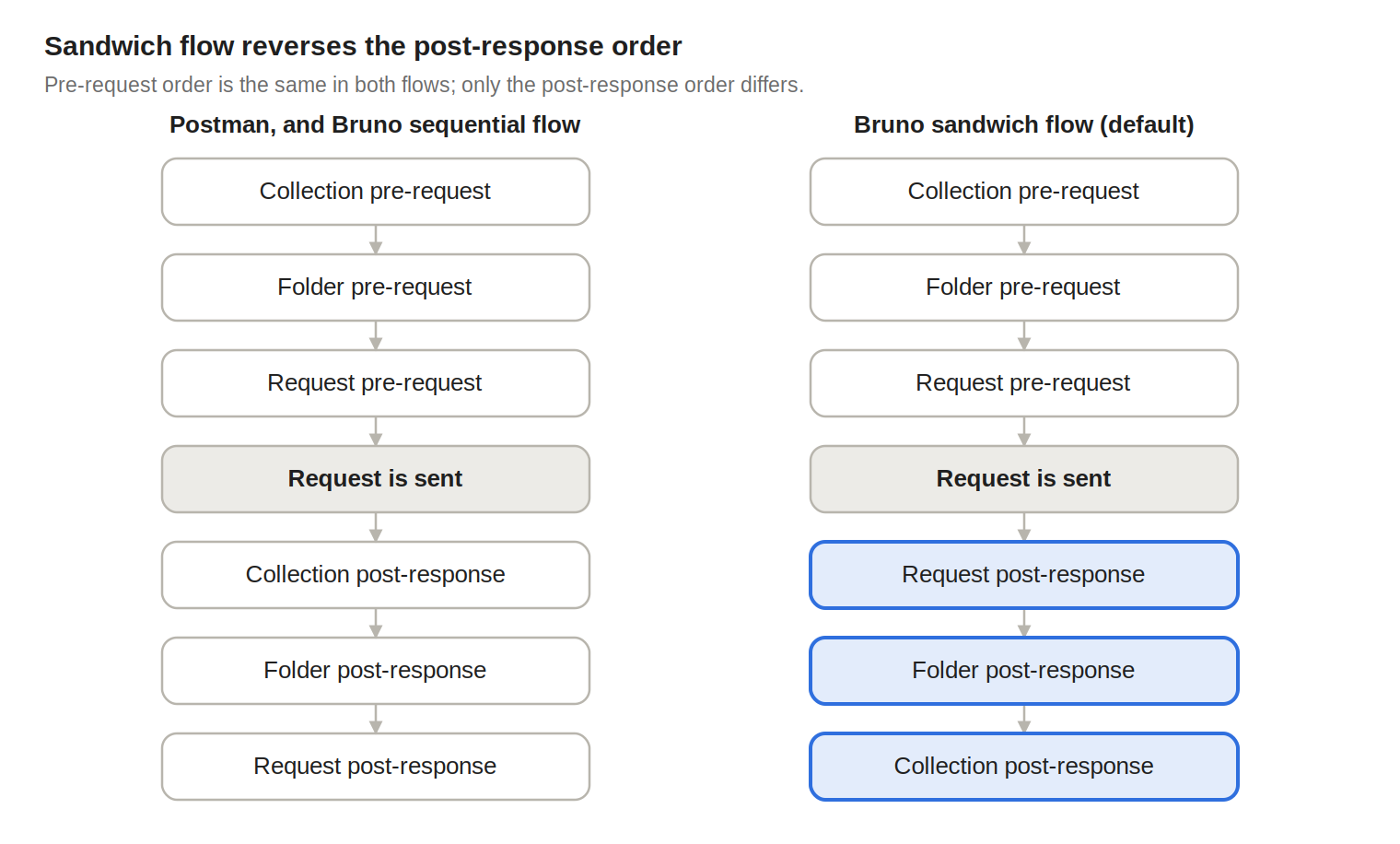
Postman's order and our sequential flow are the same picture: outer scope first at every stage. Sandwich, the default, runs post-response scripts from the request outward, so a collection-level script sees what the request-level script already changed. This setting switches a collection to sequential:
Our script flow guide has the full order for both flows.
What the rewrite covers
The translator parses each script as code rather than text, and three things follow from that:
-
It follows your variables.
const jsonData = pm.response.json()is rewritten along with every later use ofjsonData. -
It handles the old styles too:
postman.*calls,tests["name"] = expr, and bareresponseBody. -
It adds the
require()for libraries Postman exposed as globals (CryptoJS,_,moment,cheerio,tv4), turnspm.require("pkg")intorequire("pkg"), and lists every package it finds in the Install packages prompt.
The most common mappings, taken from the translator as it ships in @usebruno/converters today:
| Postman | Bruno |
|---|---|
pm.environment.get(k) / .set(k, v) / .unset(k) |
bru.getEnvVar(k) / bru.setEnvVar(k, v) / bru.deleteEnvVar(k) |
pm.environment.has(k) |
bru.getEnvVar(k) !== undefined && bru.getEnvVar(k) !== null |
pm.collectionVariables.get(k) / .set(k, v) |
bru.getCollectionVar(k) / bru.setCollectionVar(k, v) |
pm.variables.get(k) / .set(k, v) |
bru.getVar(k) / bru.setVar(k, v) (runtime, in memory) |
pm.globals.get(k) / .set(k, v) |
bru.getGlobalEnvVar(k) / bru.setGlobalEnvVar(k, v) |
pm.variables.replaceIn(str) |
bru.interpolate(str) |
pm.test(name, fn) / pm.expect(x) |
test(name, fn) / expect(x) |
pm.response.json() / .text() |
res.getBody() / JSON.stringify(res.getBody()) |
pm.response.code / .status / .responseTime |
res.getStatus() / res.statusText / res.getResponseTime() |
pm.response.to.have.status(200) |
expect(res.getStatus()).to.equal(200) |
pm.response.to.be.ok / .clientError / .notFound |
expect(res.getStatus()).to.be.within(200, 299) / .within(400, 499) / .to.equal(404) |
pm.response.to.have.header("X") |
expect(res.getHeaders()).to.have.property("X".toLowerCase()) |
pm.response.to.have.jsonBody(path) / .jsonSchema(schema) |
expect(res.getBody()).to.have.jsonBody(path) / .jsonSchema(schema) |
pm.response.headers.get("X") |
res.getHeader("X") |
pm.request.headers.add({key, value}) / .upsert(...) / .remove(k) |
req.setHeader(key, value) / req.setHeader(...) / req.deleteHeader(k) |
pm.request.url / .method / .body |
req.getUrl() / req.getMethod() / req.getBody() |
pm.sendRequest(options, cb) |
await bru.sendRequest(options, async cb) with header[] turned into headers{} and body.raw into data |
postman.setNextRequest("Name") / setNextRequest(null) |
bru.runner.setNextRequest("Name") / bru.runner.stopExecution() |
pm.execution.skipRequest() |
bru.runner.skipRequest() |
pm.iterationData.get(k) / pm.info.iteration / pm.info.iterationCount |
bru.runner.iterationData.get(k) / bru.runner.iterationIndex / bru.runner.totalIterations |
pm.info.requestName / pm.environment.name |
req.getName() / bru.getEnvName() |
pm.cookies.get(k) / pm.cookies.jar() |
bru.cookies.get(k) / bru.cookies.jar() |
pm.visualizer.set(template, data) |
bru.visualize("html", { template, data }) |
tests["name"] = expr |
test("name", function() { expect(Boolean(expr)).to.be.true; }) |
Anything the translator does not recognize stays in the script untouched. The calls that most often end up in this group are pm.response.to.be.json, pm.response.reason(), pm.request.auth, pm.execution.location, pm.info.eventName, and pm.vault.*.
A before and after
An example Postman login test:
What lands in the Post Response script after import:
Everything converted except one line. pm.response.to.be.json survived untouched, and the first test will fail with a pm is not defined error until it is replaced. The rest of this guide is about finding and fixing lines like that one.
If you want to see what the translator does to a specific snippet before importing, paste it into our online Scripts Translator. It runs the same function the import dialog uses.
A debugging workflow for converted scripts
Treat the converted collection like a codebase after a large automated refactor: find every leftover reference first, run everything once to see what breaks, then fix from the outside in. Because the collection is a folder of YAML files, most of the finding happens outside the app.
1. Grep before you run. Every script is plain text inside the collection folder, so one search lists every untranslated line with its file and line number:
An empty result means the translator handled everything it saw and you can move on to behavior. A list of hits is your to-do list, and it is usually shorter than you fear because the same three or four calls repeat across requests. A second search for require( shows which packages the scripts pull in, which you will need for step 4.
2. Run the whole collection once. Open the Collection Runner, select the environment you imported, and run everything. You do not have to start with single requests; the runner gives you the full failure list in one pass and catches problems in collection-level and folder-level scripts that a single request would also hit but not explain. Failures fall into three buckets, and the error text tells you which:
-
pm is not definedorpostman is not defined: an untranslated call. Rewrite it with the table above or the fixes below. -
... is not a functionorCannot read properties of undefined: a call that translated but now hits a different shape, such asres.json()on abru.sendRequestresponse or.queryon the string thatreq.getUrl()returns. -
Cannot find moduleorrequire is not defined: a package that is not installed, or one that needs Developer Mode.
3. Open the failing request and read the line. When a script throws, Bruno shows the error with the script and points at the line that raised it. The Script tab is split into Pre Request and Post Response; imported Postman tests are in Post Response. Add console.log() calls where you need to see a value and open the Timeline tab, which shows the main request, every request a script sent through bru.sendRequest() or bru.runRequest(), and console output in one chronological view. Timeline is the fastest way to confirm that a pre-request login call actually fired and what it returned.
4. Sort out packages. The Install packages prompt after import already classified what it found. Packages Bruno can install go into the collection folder with one click, or you can run the suggested npm install --save <package> there yourself. lodash, moment, crypto-js, chai, and the Node built-ins are available in Developer Mode without an install. uuid, axios, jsonwebtoken, path, and nanoid work in Safe Mode. Postman-only packages such as postman-collection and newman have no equivalent and the code that uses them needs a rewrite. Switching modes is a per-collection setting under Collection Settings; the JavaScript Sandbox page explains what Developer Mode allows, and it is worth staying in Safe Mode until a specific script needs more.
5. Fix, then widen the blast radius. Fix one request, run that request. Run its folder. Run the collection. Collection-level scripts run on every request, so a fix there often clears a dozen failures at once, and a mistake there breaks everything, which is why you re-run the collection after each collection-level edit.
6. Keep the original next to you. Until the run is green, keep the Postman export and, if the scripts are complex, import a second copy with Preserve scripts on into a scratch folder. Comparing the verbatim pm.* script with the translated one side by side is faster than reconstructing intent from the translated version alone. Once everything passes, delete the scratch copy and commit the collection. From then on, Git history is your migration record.
One process note: the runner writes variable changes to disk in v4, so a debugging session that sets bru.setEnvVar() a hundred times leaves the last value in the environment file. Check git status in the collection folder before committing and reset anything you did not mean to persist.
Common conversion issues and how to fix them
These are the failures we see most often after an import, with the error you will get and the replacement. Each snippet is written for the tab named above it, so you can paste it straight into a request in your own collection.
pm is not defined inside a test
The translator has no target for pm.response.to.be.json, so it stays behind and the whole test block fails. Replace it with our jsonBody assertion, which with no arguments checks that the body parsed as JSON.
The same pattern applies to pm.response.reason(), which becomes res.statusText, and to pm.request.auth, which has no script equivalent because auth is configured in the Auth tab and inherited down the tree.
Status assertions that compare a number to a string
Postman lets you write pm.response.to.have.status("OK"). The translator turns every to.have.status() into a comparison against res.getStatus(), which is a number, so the string form fails with expected 200 to equal 'OK'. Compare against the status text instead.
Related: pm.response.to.have.body("...") becomes expect(res.getBody()).to.equal(...). For a JSON response res.getBody() is already an object, so compare with to.deep.equal({...}) or stringify it first.
res.json is not a function after sendRequest
This is the most common failure in pre-request scripts. Postman's response object has methods (res.json(), res.text(), res.code). Our bru.sendRequest() returns an axios-style object with properties (res.data, res.status, res.statusText, res.headers). The translator rewrites the request options and any callback it can follow, and it awaits the call so the rest of your script runs after the response arrives. It cannot always follow a response variable that you assigned and used later.
If you are touching the script anyway, drop the callback. The awaited form is easier to read and to debug, and bru.setVar() keeps the token in memory for the run instead of writing it to the environment file:
The rule of thumb when you see is not a function on a response: .json() and .text() become .data, .code becomes .status, .status becomes .statusText.
Cannot read properties of undefined (reading 'add') on the URL
pm.request.url.query.add() translates to req.getUrl().query.add(), and req.getUrl() returns a string. Build the new URL and set it back.
For headers you do not need this: pm.request.headers.add() and .upsert() translate to req.setHeader(), which works as expected.
Header assertions that never match
Response header names come back lowercased from res.getHeaders(), so a translated expect(res.getHeaders()).to.have.property("X-Request-Id") fails even when the header is present. The translator lowercases the name for to.have.header(), but hand-written lookups on the headers object need the same treatment. res.getHeader() is case-insensitive, so it is the safer call.
Comparisons against numbers and booleans from the environment
Every imported variable arrives as a string, because Postman's export carries no data types. bru.getEnvVar("retries") === 3 and bru.getEnvVar("debug") === true are always false, silently. The cleanest fix is to open the environment and set the variable's type to number, boolean, or object in the dropdown next to its value, after which the script works unchanged. Converting on read works too:
Cannot find module for lodash, moment, or crypto-js
Postman exposed these as globals. The translator adds the require() for you, but the package still has to be available. lodash, moment, and crypto-js load in Developer Mode without an install. If you want to stay in Safe Mode, the usage is often trivial to replace.
For CryptoJS hashing and HMAC signing there is no one-line substitute, so that is a case where switching the collection to Developer Mode is the right call.
setTimeout waits that never wait
Postman scripts often use setTimeout to pause before polling. The translator leaves it alone, and because Bruno awaits the script, a timer callback is not what you want. Use bru.sleep(), which pauses the script itself.
Request chaining that only worked in the runner
postman.setNextRequest() translates cleanly to bru.runner.setNextRequest() and takes the request's display name, but like Postman it only does anything during a collection run. If a request depends on another request having run first, and you want that to hold when someone sends it on its own, call the dependency from the pre-request script instead. The path is relative to the collection root and includes the folder.
Do not do this from a collection-level pre-request script, unless you add a guard. That script runs before every request in the collection, including the Login request it calls. So Get Orders triggers the collection script, which runs Login; running Login triggers the collection script again, which runs Login again, and the run never finishes. If you want the login to happen in one place for the whole collection, skip it for the Login request itself and reuse the token once you have one:
The same guard is worth adding at folder level if the Login request lives inside that folder.
Dynamic variables in URLs and bodies
, , , and the other $-prefixed dynamic variables resolve in Bruno request fields the same way they did in Postman, so those need no change. Write the placeholder in a URL, header, or body and it resolves when the request is sent, with no script involved. In scripts, use bru.interpolate("") to get one, because inside JavaScript the placeholder is just a string; that is also what pm.variables.replaceIn() translates to. You only need it when a script wants the generated value itself, for example to log it or store it. The dynamic variables reference lists what is available.
Verify the migration end to end
A migration is done when the collection runs green from the command line, not when the last request passes in the app. The CLI runs the same scripts in the same sandbox, so it is the honest check, and it is what your CI will run from now on.
Install the CLI once, then run the collection from its folder with the environment you imported:
Five flags typically matter for a freshly converted collection:
-
--env <name>to select the environment you imported. Without it no environment variables resolve, so everystyle reference fails. -
--reporter-html results.htmlto write a report file.--reporter-jsonand--reporter-junitwork the same way, and you can pass more than one. -
--sandbox developerif any script still needs Developer Mode. The CLI defaults to Safe Mode, so a collection that passes in the app with Developer Mode on will fail in the CLI until you add this flag or remove the dependency. -
--env-var name=valuefor every secret. Variables you marked as secrets are stored locally by the app and are not visible to the CLI, so pass them on the command line or from your CI's secret store. -
--bailto stop at the first failure while you are still fixing things, and drop it once you want the full picture.
The HTML report is the artifact to hand to whoever owned the Postman collection: every request, every test, pass or fail, in one file. For pipelines, --reporter-junit results.xml produces output that any CI system can render.
Once it passes locally, wire it into CI so it stays green. Our GitHub Action installs the CLI, runs the command you give it, and exposes pass and fail counts as step outputs:
The action prepends bru for you, so the command starts with run. The full list of run options, including tags, iteration counts, and data files for data-driven runs, is in the CLI command reference.
If you had Postman monitors or Newman runs in CI, this is their replacement. Newman itself has no place in the new setup, and any script that required it was already flagged as unsupported by the Install packages prompt.
Wrap-up
For most collections the translator handles everything. When it does not, what it leaves behind is a short, predictable list: a handful of pm.* calls with no equivalent, response objects that changed shape, packages that need a home, and variables that came in as strings. Grep for the leftovers, run the collection once, fix from the collection level down, and finish with a green CLI run.
Two habits pay off after the migration. Keep scripts in Safe Mode unless a specific library needs more, and prefer bru.setVar() for values that only live for one run, so the environment files you commit stay clean. If a snippet is not behaving the way it did in Postman, paste it into the Scripts Translator to see exactly what the import produced, then check the JavaScript API reference for the Bruno call you want.
If you hit a conversion the translator should have handled, tell us. Every mapping in the table above started as someone's migration, and the GitHub discussions are where the next ones get added.
Ready to try it? Download Bruno, import your Postman collection, and see how much of it runs before you touch a single script.