Bruno v3 → v4: Breaking Changes


Bruno v4 brings meaningful improvements to how secrets are stored, how environment variables behave, and what the collection schema supports. Most of the changes are automatic when you upgrade through the app. But a handful of them require attention before you upgrade, especially if your scripts touch sensitive values or your team runs mixed Bruno versions. This guide walks through every change, who is affected, and exactly what to do.
Table of Contents
What Changed in v4 at a Glance
| Change | Action needed? | Who is affected |
|---|---|---|
| Secret Manager config moves into environment files | App users: automatic. CLI users: open app first. | Anyone using external secrets |
| Script-set env vars persist to disk by default | Yes — audit before upgrading | Scripts calling setEnvVar / deleteEnvVar |
| Multiple WebSocket messages per request | Nothing to migrate; plan for mixed-version teams | Teams with YAML WebSocket collections |
| Descriptions and variable types in schema | Nothing to migrate; plan for mixed-version teams | Teams using older Bruno versions |
| CLI JUnit classname is now the request path | Yes — update CI tooling that reads classname | CI pipelines using JUnit XML output |
Secret Manager Config Moves into Environments
What is changing
In v4, external secrets configuration no longer lives in a secrets.json file at the root of your collection. It moves into your environment files, under a new externalSecrets section, managed from the Environment UI instead of from Collection Settings > Secrets.
Only the secret manager configuration moves. Your actual secret values are never written into the collection. Secret encryption and storage work the same way as before.
You also get a simpler way to reference a secret by its name directly:
| Syntax | Status |
|---|---|
{{name.keyname}} |
New (recommended) |
{{$secrets.name.keyname}} |
Old (deprecated, works for 3 months) |
Both forms resolve to the same value for now, so nothing breaks immediately. The old {{$secrets.*}} form is deprecated and support is removed after three months. Wherever the old syntax appears in your scripts and requests, the app marks it with an underline and a hover tooltip pointing you to the new form.
Why this change was made
Secrets are environment-specific. Your Production token is not your Staging token, so keeping the configuration alongside the environment it belongs to is clearer. It removes a separate root-level file to manage, makes the environment the single source of truth for secrets, and brings full secret-manager support to the CLI across AWS, Azure, and Vault. The old secrets.json model also could not support workspace and global environments — the new model can.
What you need to do
Using the Bruno app (GUI)
Nothing to do. Migration is automatic. When you open a collection in v4, Bruno moves your secret config from secrets.json into the relevant environment files and deletes secrets.json once migration succeeds. Only the mappings and provider config move, never the secret values.
Using the CLI or CI
The CLI does not migrate on its own. If your collection still uses a secrets.json, your run shows a warning. Open the collection in the Bruno app first to complete the migration, then your CLI and CI runs pick up the config from the environment files — pass the environment name via bru run --env <name>. The warning does not block the run.
Before and after
Before — secrets.json at the collection root:
{
  "type": "aws-secrets-manager",
  "data": [
    {
      "environment": "Production",
      "secrets": [
        { "name": "dbPassword", "secretName": "prod/db/credentials", "enabled": true },
        { "name": "apiKey",     "secretName": "prod/payment/api-key",  "enabled": true }
      ]
    }
  ]
}
After — YAML format, environments/production.yml:
name: Production
variables:
  - name: baseUrl
    value: https://api.example.com
externalSecrets:
  type: aws-secrets-manager
  variables:
    - name: dbPassword
      secretName: prod/db/credentials
      enabled: true
    - name: apiKey
      secretName: prod/payment/api-key
      enabled: true
After — BRU (legacy) format, environments/staging.bru:
vars {
  baseUrl: https://staging.api.example.com
}
vars:externalsecrets:aws-secrets-manager {
  dbPassword: staging/db/credentials
  ~apiKey: staging/payment/api-key
}
Environment Variable Changes Are Saved to Disk by Default
What is changing
In v4, scripts that modify environment variables automatically persist those changes to disk. This makes script-driven variable updates consistent and predictable. The thing to watch out for is that if your scripts set tokens, credentials, or other sensitive values with bru.setEnvVar(), bru.deleteEnvVar(), or bru.setGlobalEnvVar(), those values will now be written to your environment file and could be committed to version control by accident.
How each API behaved before v4
| API | Persisted to disk before v4? | Persisted in v4? |
|---|---|---|
bru.setEnvVar() |
No (memory only, unless { persist: true } passed) |
Yes |
bru.deleteEnvVar() |
No | Yes |
bru.setGlobalEnvVar() |
Yes, but strings only — non-strings dropped on save | Yes, all types |
bru.setVar() |
Never (memory only) | Still memory only |
bru.deleteVar() |
Never (memory only) | Still memory only |
Who is affected
You are affected if any of these apply
- Your pre-request or post-response scripts call
bru.setEnvVar()orbru.deleteEnvVar() - Any of those calls handle sensitive values such as access tokens, refresh tokens, API keys, or passwords
- You commit your collection or environment files to version control, where a newly persisted secret could be pushed to a shared repository
- You relied on the old behavior where
setEnvVar()values stayed in memory only
You are not affected if
- Your scripts only set non-sensitive values such as a base URL, a counter, or a request ID
- You do not modify environment variables from scripts at all
How to prepare
Audit your scripts
Search your collection for calls to bru.setEnvVar(), bru.deleteEnvVar(), and bru.setGlobalEnvVar(). Note any that write sensitive values.
Switch sensitive calls to in-memory APIs
For sensitive values, replace setEnvVar() with bru.setVar() and deleteEnvVar() with bru.deleteVar(). These keep the value in memory for the duration of the run only.
Use the v4 migration helper in v3.5.0
In Bruno v3.5.0, enable the v4 migration option in the footer panel. It highlights these API calls in the sidebar, scripts, and tests so you can find and update the sensitive ones before upgrading.
Non-sensitive values do not need to change. If your script sets a baseUrl, a page counter, or a request ID, persisting it to disk is fine and you do not need to do anything.
Multiple WebSocket Messages
What is new
In v4 you can add multiple WebSocket messages to a single request. To support this, Bruno saves YAML WebSocket requests in a new message format. BRU (legacy) format collections are not affected by this schema change.
Nothing to migrate before upgrading. Your existing WebSocket requests keep working. The main thing to plan for is mixed-version teams.
Schema change (YAML format only)
v3.5.0 (single message)
message:
  type: json
  data: "{ \"action\": \"ping\" }"
v4 (multiple messages)
message:
  - title: Ping message
    selected: true
    message:
      type: json
      data: |-
        { "action": "ping" }
If some teammates are on older versions and you save a WebSocket request with multiple messages in v4, they may not load that request correctly in v3.5.0 or earlier. The simplest fix is to coordinate the upgrade across the team.
Descriptions and Variable Types
What is new
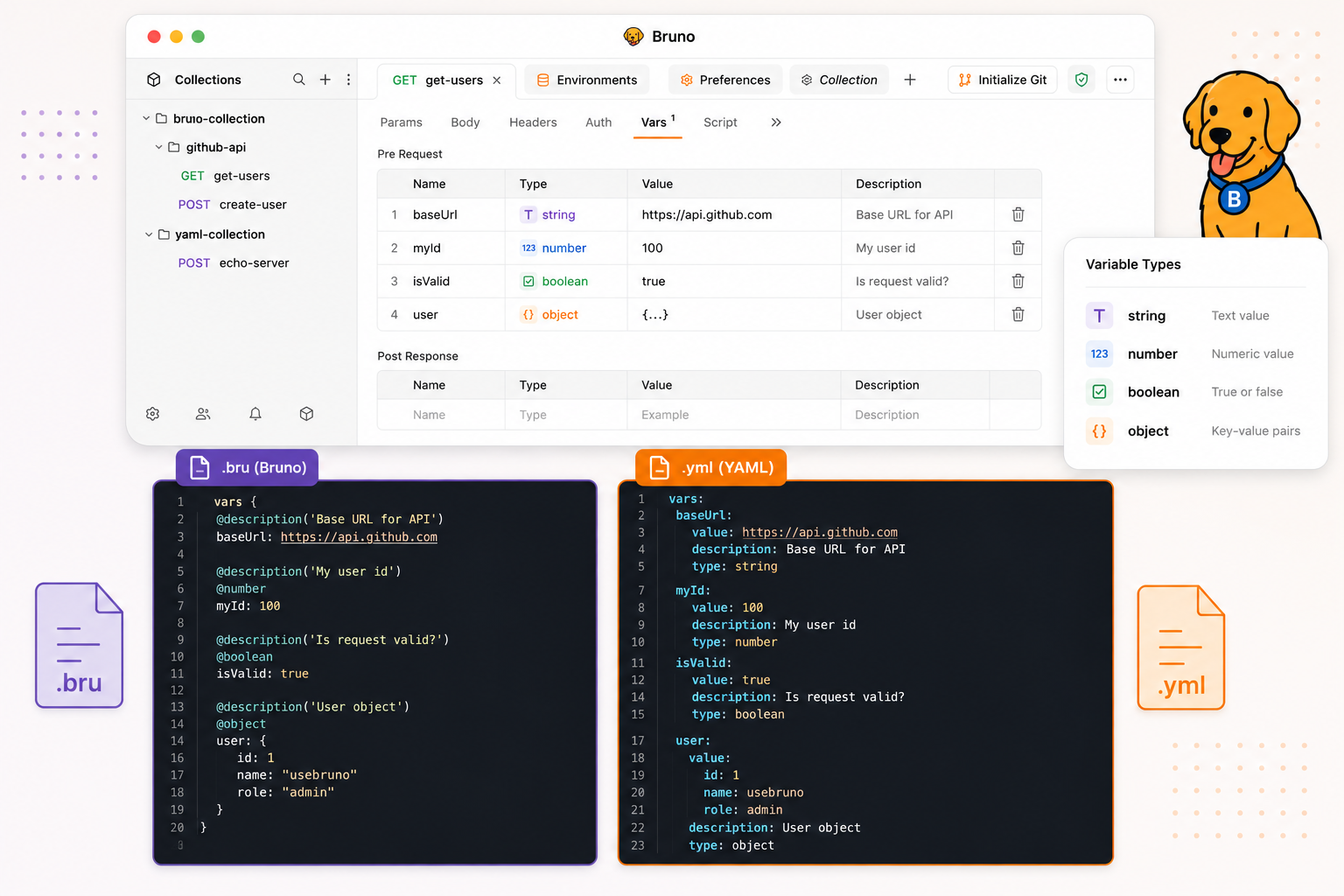
In v4 you can add descriptions to params, headers, multipart form fields, and variables, and assign types to variables. Bruno stores these as annotations on the line above each pair: descriptions as @description('...'), and types as @string, @number, @boolean, or @object.
Nothing to migrate before upgrading. The mixed-version caveat below is the main thing to plan for.
How older versions handle the new schema
| Bruno version | What happens when opening a v4 collection |
|---|---|
| v3.4.0 to pre-v4 | Collection opens fine. Descriptions are not shown in the UI and variables do not get type handling, but nothing breaks. |
| Below v3.4.0 | The older parser does not understand the annotation syntax. Affected requests may fail to load, and environments may appear to be missing. |
Schema change examples
Before v4 — BRU format
headers {
  Content-Type: application/json
  Authorization: Bearer
}
vars:pre-request {
  baseUrl: https://api.example.com
  retryCount: 3
}
v4 — BRU format with annotations
headers {
  @description('Payload format')
  Content-Type: application/json
  @description('Auth token')
  Authorization: Bearer
}
vars:pre-request {
  @string
  @description('Base URL for all requests')
  baseUrl: https://api.example.com
  @number
  retryCount: 3
}
Before v4 — YAML format
runtime:
  variables:
    - name: baseUrl
      value: https://api.example.com
    - name: retryCount
      value: "3"
v4 — YAML format with types
runtime:
  variables:
    - name: baseUrl
      value: https://api.example.com
      description: Base URL for all requests
    - name: retryCount
      value:
        type: number
        data: "3"
CLI JUnit Report: classname Now Uses the Request Path
What is changing
In the CLI JUnit reporter, each test case's classname attribute changes from the request URL to the collection path including the request name. For example, a request called Get Users inside a Users folder would produce Users/Get Users as the classname.
The reason for this change is that CI tools like Xray and Azure DevOps use classname + name as a test's unique identifier. Because the URL changes per environment, the same test produced a different classname when run against staging versus production, and it showed up as duplicate test cases. The collection path is stable across environments so the same test now maps to a single entry.
Before and after
Before (URL, varies per environment)
<!-- Staging run -->
<testcase
  name="Status is 200"
  classname="https://staging.api.example.com/users"
/>

<!-- Production run -->
<testcase
  name="Status is 200"
  classname="https://prod.api.example.com/users"
/>
After (stable collection path)
<!-- Staging run -->
<testcase
  name="Status is 200"
  classname="Users/Get Users"
/>

<!-- Production run -->
<testcase
  name="Status is 200"
  classname="Users/Get Users"
/>
What you need to do: If your CI tooling or scripts read classname expecting a URL, update them to expect the collection path format instead. If you only need the request name, extract it from the last segment of the path. You are not affected if you do not consume the CLI's JUnit output or do not key on classname.
Before You Upgrade Checklist
Work through this list before upgrading any machine in your team.
Audit scripts for sensitive env var calls
Find every bru.setEnvVar(), bru.deleteEnvVar(), and bru.setGlobalEnvVar() call that writes a sensitive value, and move those to bru.setVar() / bru.deleteVar(). Use the v4 migration helper in v3.5.0 to highlight them automatically.
Coordinate the upgrade across mixed-version teams
If someone saves a collection in v4 and a teammate opens it in an older version, the following can break:
- New description and variable-type fields: v3.4.0 to pre-v4 opens fine but ignores the new fields. Below v3.4.0 may fail to load affected requests and environments may appear missing.
- External secrets migrated to environment files will not be accessible to teammates on pre-v4, since older versions read from
secrets.json. - YAML WebSocket requests with multiple messages may not load correctly in v3.5.0 or earlier.
Update CI tooling that reads classname from JUnit XML
If your pipeline reads classname from the CLI JUnit report and expects a URL, update it to expect the collection path format Folder/Request Name instead.
Once on v4
Verify secret config migration in the app
If your collection uses an external secret manager, open it in the Bruno app so the secret config migrates out of secrets.json. Then go to Collection Settings > Secrets > Go to Environment to confirm the secrets migrated successfully.
Do the migration before running from the CLI
If you run collections from the CLI, complete the in-app migration first. Once done, your CLI runs pick up the secret config from the environment files when you pass bru run --env <name>.
Update deprecated secret references when convenient
Replace {{$secrets.name.keyname}} with {{name.keyname}} across your requests and scripts. The old form works for three months so there is no urgency, but the app marks each occurrence with an underline and tooltip to make them easy to find.
Audit your scripts, coordinate your team, and the upgrade to v4 is straightforward.